

In short: UI is how an ecommerce store looks and UX is how it works. Together they decide whether shoppers find products, trust your store and finish checkout. The best-evidenced wins are clear navigation and search, fast mobile pages, a transparent checkout and accessible design, all of which a Shopify store can deliver through theme choice, apps and checkout extensions.
Imagine you invested a lot of money in a product, let’s say you bought a high-tech Smart home device (like a smart thermostat or speaker). But it’s too complex - you end up not using it.
Now, think about your e-commerce website. You might have products people genuinely want, but if your site lacks good UI UX ecommerce design, customers can’t navigate it easily. Or worse, they abandon their carts at checkout.
What feels like a small issue in design or usability can quietly turn into a conversion nightmare for e-commerce business owners. Bet you don’t want that to happen to your store. For that, we are writing this blog that contains everything you need to know for a top-notch UI/UX design for your E-commerce Store in 2025. We reviewed it in October 2026 and refreshed the statistics, standards and Shopify details below.
So, let’s get started with the most important question -
What is UI and UX in E-commerce?
UI (user interface) is the visual and interactive layer of an online store: layout, buttons, colors, typography and images. UX (user experience) is the quality of the whole journey, from product discovery to checkout and delivery. In simple terms, UI is how your store looks, and UX is how it works.
Before we dive into why UI/UX is critical for eCommerce in 2025, let’s break it down.
UI (User Interface) is everything your customers interact with on your website- buttons, colors, layout, typography, and images. It’s the visual and interactive layer of your store.
UX (User Experience) is how your customer feels while using your site. It covers the journey from product discovery to checkout: how easy, enjoyable, and smooth it is.
In simple terms:
UI is how it looks. UX is how it works.
When combined, a well-designed UI/UX creates a storefront that’s not just beautiful, but functional. And most importantly, one that sells.
Is website development possible without website design?
Yes, website development is technically possible without a design, but it often leads to inefficient code structure, poor user experience, and extra development time. Design provides the layout, visual hierarchy, and user flow that guides the development process. It is one of the questions we are asked most often, which is why our website design service comes before any build starts.
Why UI/UX Design Matters for E-commerce in 2025
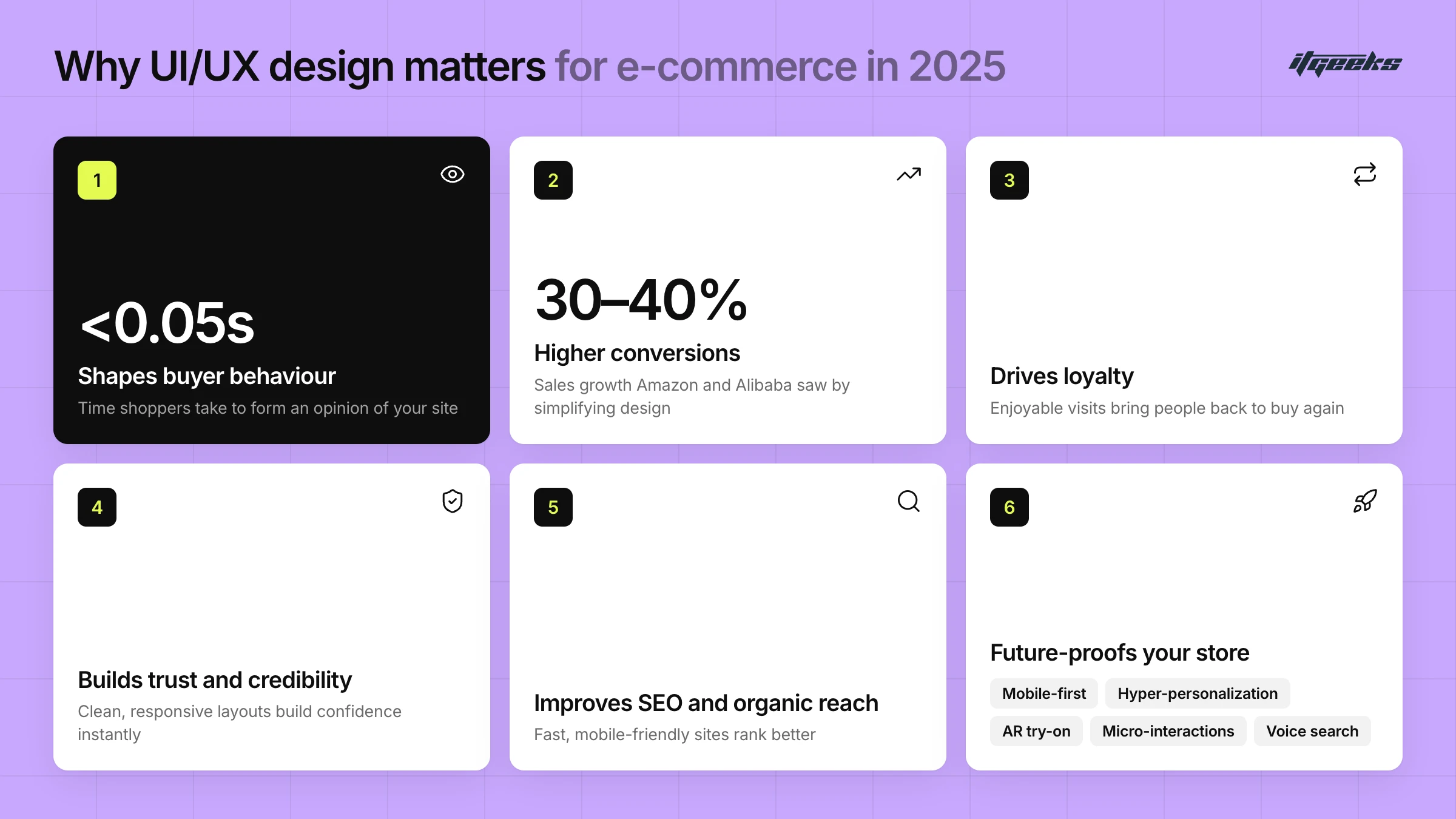
Your e-commerce store is your most powerful salesperson and its user interface (UI) and user experience (UX) are what decide whether a visitor stays, buys, or bounces. In 2025, where online shopping is the default, and attention spans are shorter than ever. According to a research paper hosted by Google Research, "websites with low visual complexity and high prototypicality were perceived as highly appealing". This suggests that clean, familiar designs create the most positive first impressions.
As per the research, it is safe to say that in 2025, the ui ux ecommerce design for ecommerce isn’t just important for the looks, it’s important for the impact.
First Impressions Shape Buyer Behavior
Today’s shoppers form an opinion about your site very quickly. In a well-known study, Lindgaard and colleagues (2006), reported by Nature, people judged a web page’s visual appeal after seeing it for just 50 milliseconds (0.05 seconds), and those snap judgments matched their later, longer ones. A clean, modern interface invites shoppers to explore further, while poor visuals lead to quick exits. Strong UI/UX ecommerce design creates instant appeal, turning passive visitors into active shoppers.
Better UX = Higher Conversions
Smooth navigation, clear CTAs, and streamlined checkout are critical. Baymard Institute’s research suggests the average large e-commerce site could lift its conversion rate by around 35% through checkout design improvements alone, and its benchmark found that the average site still has dozens of checkout fixes to make. Personalized product recommendations, search and merchandising tools are the other big lever for turning browsing into buying.
User Experience Drives Loyalty
Consistent, enjoyable interactions make people return. A thoughtfully designed ecommerce experience builds trust and convenience, encouraging repeat purchases. The better your UX, the more your customers stick around and spread the word.
Design Builds Trust & Credibility
Users often judge a store’s trustworthiness based on how it looks and works. Slow load times, cluttered layouts, or confusing navigation signal risk. On the other hand, a clean and responsive UI/UX ecommerce layout builds confidence in your brand instantly. Trust is also a checkout issue: in Baymard’s survey data, 19% of US shoppers who abandoned a checkout said they did not trust the site with their credit card information.
Improved SEO & Organic Reach
Google’s ranking algorithms now reward user-first experiences. Google’s Core Web Vitals measure real-world loading, interactivity and visual stability, and fast-loading, mobile-friendly designs with clear site architecture tend to keep shoppers engaged for longer, meaning more traffic, more engagement, and ultimately, more sales.
Future-Proofing Your Store
Design trends evolve, what worked yesterday may not work tomorrow. In 2025, the best-performing ecommerce UI/UX will be built for:
Mobile-first shoppers
Hyper-personalization
AR try-on experiences
Micro-interactions
Voice search optimization
Stores that adapt fast will lead, while others get left behind. Shoppers are also starting to use AI assistants to research and buy, so clean product data and clear structure matter more than ever. We covered one example in our post on ChatGPT’s in-chat shopping feature.
What are the most important parts of ecommerce UX?
The most important parts of ecommerce UX are the points where shoppers decide to continue or leave: navigation and search, product pages, mobile and page speed, a clear checkout, and trust signals such as accessibility. Fixing friction at these steps usually moves revenue more than cosmetic changes elsewhere.
That is what high-converting UI/UX design for online retailers comes down to: removing friction at each of these steps, not decorating the page.
Navigation and search: shoppers must find the right product in a few clicks. Baymard’s 2026 benchmark found that the homepage and category navigation of most leading US and European sites performs at only a “mediocre” to “poor” level.
Product pages: clear images, price, variants, delivery information and reviews answer the questions that stop a purchase.
Checkout: according to Baymard’s analysis of 50 studies, the average documented cart abandonment rate is 70.22%, and the main checkout-related reasons shoppers gave were extra costs (40%), slow delivery (20%), distrust of the site with card details (19%), forced account creation (18%) and a long or complicated process (17%).
Speed and mobile: slow, desktop-first layouts lose shoppers before they see a product.
Accessibility: an inaccessible store excludes customers and creates legal risk.
Real Case Study That Proves the Power of Shopify UI UX
As a Shopify Platinum Partner, we recently had the opportunity to collaborate with the dynamic brand - TrailGrid Pro: a brand ready to scale but held back by its outdated E-commerce platform.
Their challenges were multi-layered:
The platform couldn’t keep up with their growing business needs. It lacked scalability, delivered poor mobile performance, and offered limited filtering options, making product discovery frustrating for users. On top of that, the UI/UX design fell short, resulting in weak first impressions, clunky navigation, and a complex checkout experience. The overall user journey was far from ideal, hurting engagement and conversions.
Our Approach: Migration + Store Setup
We tackled the project with a two-pronged solution:
Platform Migration to Shopify
Custom Website Design & Development tailored for performance and experience
Our expert team at ITGeeks conducted in-depth sessions with the TrailGrid Pro team to understand their brand vision and user needs. Within just two months, we transformed their store into a high-performing, intuitive Shopify site - the one that went on to win the Industry’s Best Website Award.
Not only that, after this design revamp TrailGrid Pro reported a significant improvement in terms of increased traffic acquisition, better navigation and higher conversion rates.
Read more about this case study here.
The Business Case for Investing in UX Design
UI/UX isn’t just a design decision; it’s a business one. Three points from independent research make the case:
Checkout design alone is worth a lot: Baymard estimates that the average large e-commerce site can gain around a 35% increase in conversion rate from better checkout UX.
Speed pays: a Deloitte Digital study for Google found that a 0.1-second improvement in mobile site speed was associated with an 8.4% increase in retail conversions (Milliseconds make millions, 2020).
Friction is expensive: roughly 7 in 10 carts are abandoned, and most of the reasons shoppers give are design and policy issues a store can fix.
This means that investing in UI UX ecommerce design is directly tied to revenue, customer loyalty, and long-term scalability. Yet, many decision-makers still see UX as a “nice to have.” If you're looking to build a strong case for executive buy-in, focus on how better UX improves retention, reduces acquisition costs, and increases repeat purchases, all of which affect the bottom line. If you want to put numbers on it for your own store, our conversion rate optimization service starts with exactly that kind of funnel review.
Best ecommerce website design best practices
In today’s world, exceptional UI/UX design transcends aesthetics, it's pivotal for driving conversions, fostering customer loyalty, and ensuring business growth. Implementing the following ecommerce website design best practices can significantly enhance user experience and impact your bottom line:
Clean, Distraction-Free Layout
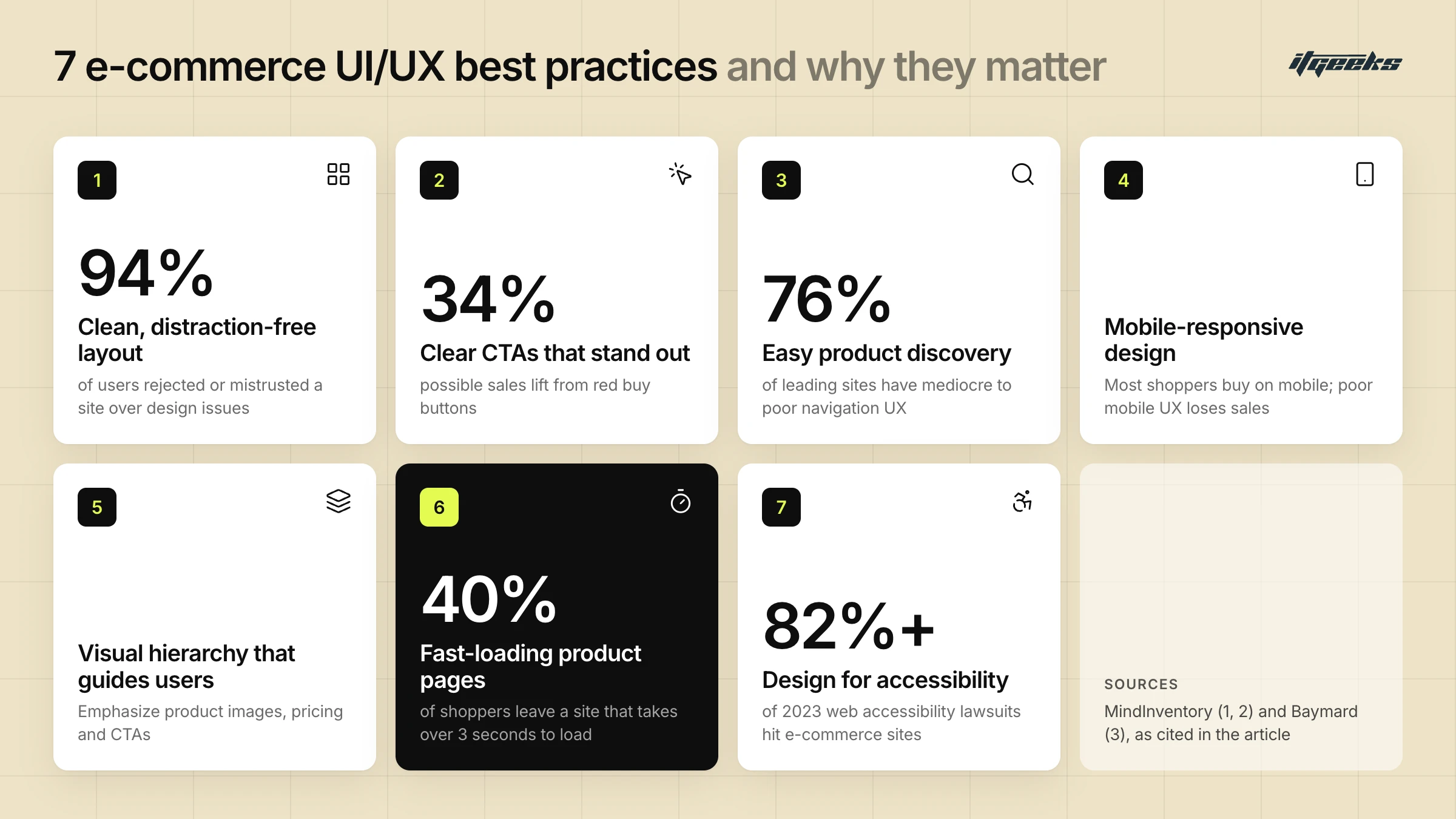
A minimalist design approach reduces cognitive load, allowing users to focus on essential elements. The Google-hosted research quoted above points the same way: clean, familiar layouts were rated as more appealing. Put the product, price and main action first, and keep banners, pop-ups and secondary links from competing with them. Our guide to a high-converting Shopify homepage shows how to apply this above the fold.
Clear CTAs That Stand Out
Effective call-to-action (CTA) buttons guide users toward desired actions. Rather than relying on a single “magic” button color, make the primary button obvious through contrast, size, spacing and a specific label such as “Add to cart”. Shopify’s theme guidance asks for at least 4.5:1 contrast for normal text and 3:1 for large text, icons and input borders, which is a sound baseline for button design too.
Easy Product Discovery
Facilitating seamless product discovery is crucial. Baymard’s benchmark of leading US and European sites found that most perform at only a mediocre to poor level for homepage and category navigation UX, which highlights the need for improved product findability. Keep menus short and predictable, show filters that match how people shop, and make search forgiving. On Shopify, the free Search & Discovery app lets you set up filters, synonym groups and product boosts without custom code.
Mobile-Responsive Design
For many stores, most visits now come from phones, so check your own analytics and design for the small screen first. A poor mobile experience can lead to significant drop-offs in engagement and sales. Use large tap targets, a sticky add-to-cart where it helps, and short forms.
Visual Hierarchy That Guides Users
Implementing a clear visual hierarchy helps users navigate your site intuitively. Emphasizing key elements like product images, pricing, and CTAs can lead to higher engagement and conversion rates.
Fast-Loading Product Pages
Page speed is a critical factor in user retention. Google’s Core Web Vitals define “good” as Largest Contentful Paint of 2.5 seconds or less, Interaction to Next Paint of 200 milliseconds or less and Cumulative Layout Shift of 0.1 or less, measured at the 75th percentile of page loads. The Deloitte Digital study mentioned above links even a 0.1-second mobile speed gain to higher retail conversions. Compress images, limit heavy apps and scripts, and test on real mobile devices.
Design for Accessibility
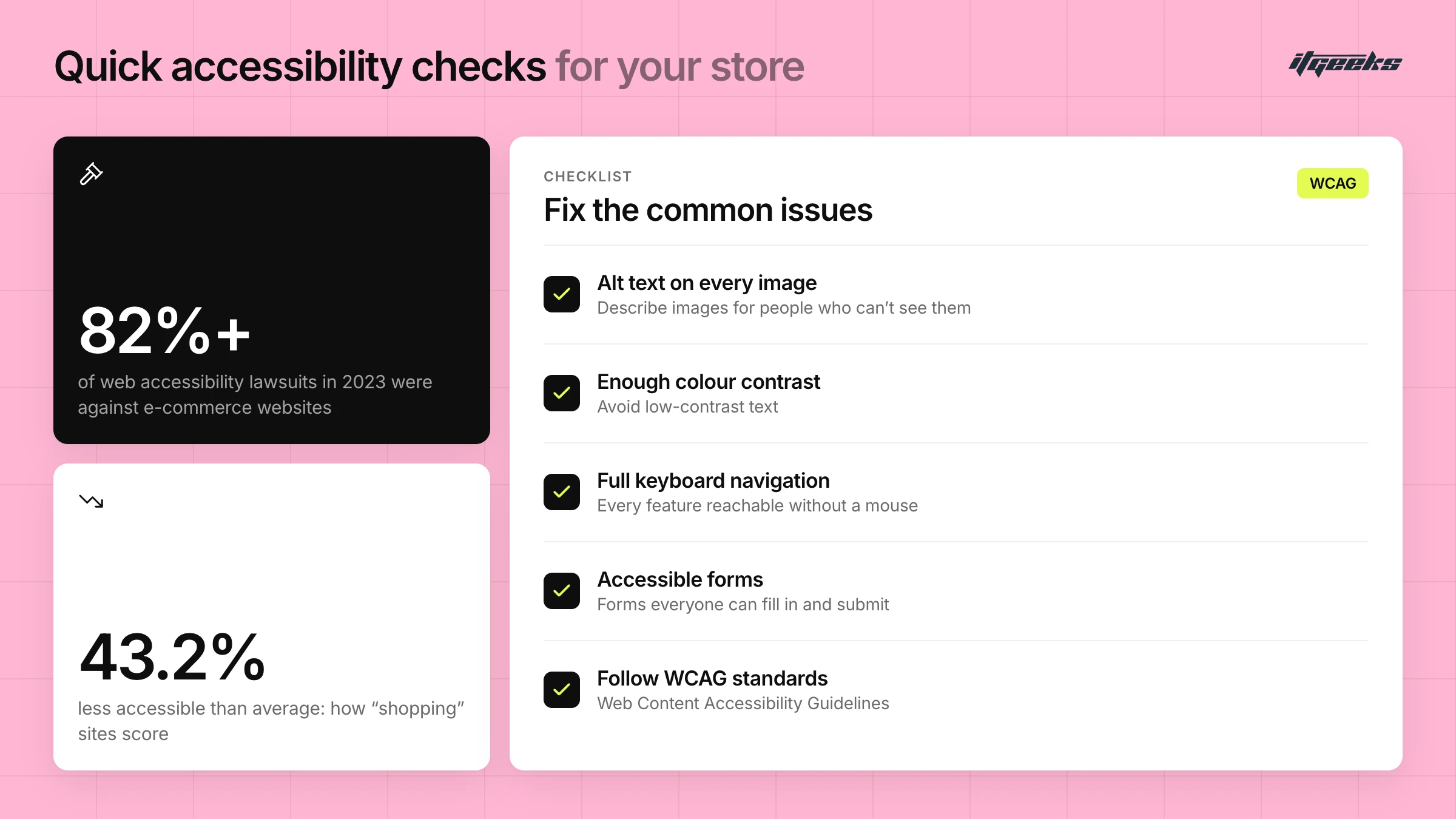
Ensure your website is usable by people with disabilities by adhering to accessibility standards like the Web Content Accessibility Guidelines (WCAG). WCAG 2.2 became a W3C Recommendation in December 2024 and adds criteria that matter for shopping, such as minimum target size, redundant entry and accessible authentication.
The legal pressure is real. UsableNet’s 2025 year-end report counted 5,114 ADA digital accessibility lawsuits in the US, and e-commerce accounted for 70% of them. In the EU, the European Accessibility Act has covered e-commerce services since 28 June 2025. Common issues include low-contrast text, missing alternative text for images, and inaccessible forms.
Sounds complex? We’ve got you back. Talk to UI UX designers at ITGeeks and get real answers to your questions.
Simple, Transparent Checkout and Post-Purchase UX
Checkout is where UX turns directly into revenue. Show the full cost early, offer guest checkout, keep forms short and make the next step obvious, since extra costs, forced accounts and long processes are all top reasons shoppers abandon, according to the Baymard data above. For a checkout UX industry average to benchmark against, Baymard’s data puts the average documented cart abandonment rate at 70.22%, and its checkout usability benchmark found the average site still has 32 unique improvements to make in its checkout flow. UX does not end at payment either: a clear confirmation page, order status and delivery updates reduce support queries and encourage a second purchase. On Shopify, checkout extensibility lets you customize the checkout as well as the thank-you and order status pages with checkout UI extensions.
How do you improve ecommerce UX?
Improve ecommerce UX by finding where shoppers drop off, fixing the biggest friction first, and measuring the result. Start with analytics and real user behavior, not opinions, then change one thing at a time so you can see what worked.
Map the funnel. Use GA4 to see where visitors leave between landing page, product page, cart and checkout, split by device.
Watch real behavior. Session recordings, heatmaps and short usability tests with five or six target customers show why people stall.
Fix the biggest blockers first. Prioritize navigation, search, product page clarity, mobile speed and checkout friction.
Test changes. A/B test meaningful changes where traffic allows, and watch Core Web Vitals after every release.
Audit accessibility. Check contrast, keyboard use, alt text and form labels against WCAG 2.2.
If you are planning a bigger overhaul, read our guide to a Shopify store redesign first.
Shopify-Specific UI/UX Tips
To optimize your Shopify store's user experience in 2025, consider these tailored strategies:
Tailor Themes to Your Brand
Shopify's theme customization tools allow you to align your store's design with your brand identity. Start from one of Shopify’s free themes, such as Dawn or the newer Horizon family, which Shopify describes as the flagship of a new generation of first-party themes built with theme blocks, and use its modular structure for flexibility and performance. Our guide to choosing the perfect Shopify theme explains how to compare options.
Utilize Shopify UI Elements Smartly
Incorporate Shopify's built-in UI components, such as product carousels, quick view modals, and dynamic filters, to enhance user interaction and streamline navigation. These elements are designed to integrate seamlessly with the Shopify platform, ensuring consistency and reliability.
Leverage UX Apps and Extensions
Enhance your store's functionality with Shopify's extensive app ecosystem. Tools like Klaviyo for email marketing, Yotpo for reviews, and ReConvert for post-purchase upsells can significantly improve user experience and conversion rates. Every app adds code, so keep only the ones that earn their place and re-check page speed after installing.
Ensure Accessibility Compliance
Design your store to be accessible to all users, including those with disabilities. Follow Shopify's accessibility best practices, such as providing alternative text for images, ensuring keyboard navigability, and maintaining sufficient color contrast.
Optimize for Mobile Devices
With a significant portion of users shopping on mobile devices, ensure your store is responsive and provides a seamless mobile experience. Prioritize touch-friendly navigation and fast loading times to cater to mobile shoppers.
Conclusion
Choosing the right design approach for your UI UX ecommerce store is a strategic investment that directly influences user experience, conversions, and customer retention. For 2025 and beyond, focusing on best practices such as mobile responsiveness, fast load times, accessibility, and clean design will help create an engaging and seamless shopping experience for your customers.
Partnering with an experienced Shopify UX designer ensures your store stands out in a competitive e-commerce landscape. With expertise in Shopify's platform and design principles, we can help you tailor your store to deliver an optimized, user-centric experience that not only looks great but also converts visitors into loyal customers.
At ITGeeks, we bring the expertise of a Shopify Platinum Partner that has supported 10,000+ brands to help you craft a store that doesn’t just attract visitors but turns them into loyal customers. Let’s design a Shopify experience that drives real growth.