

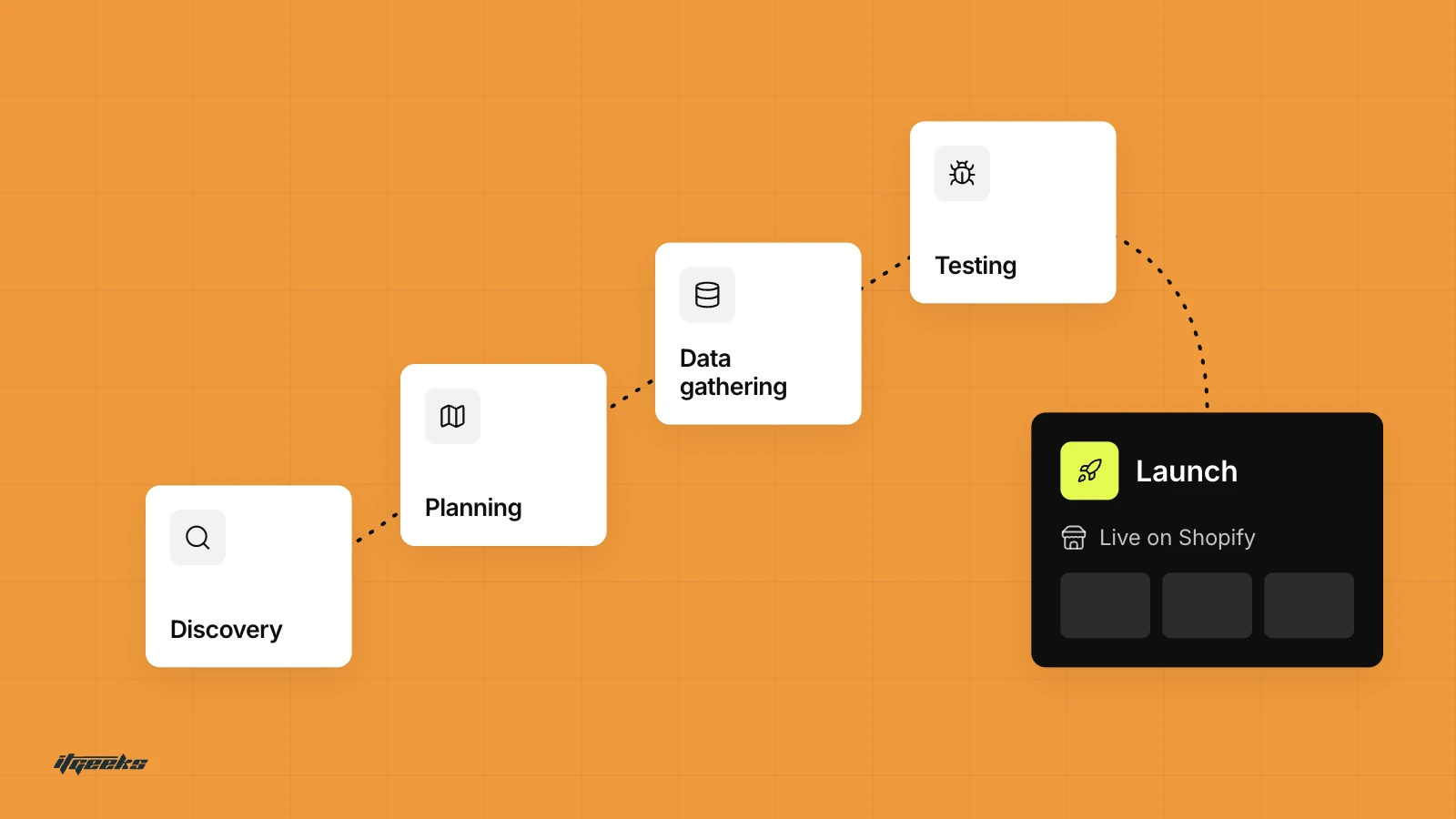
In short: to migrate to Shopify without the hassle, plan before you move anything. Audit your catalogue, import products, then customers, then historical orders. Set up your theme, shipping, taxes and payments, place test orders, map every old URL to a new one with 301 redirects, and connect your domain only when the checks pass. Shopify’s own migration guide follows the same sequence.
The commerce world is moving at lightning speed. Mobile shopping, omnichannel selling, and hyper-personalized experiences are no longer optional, they’re the norm. But here’s the real question: Is your platform keeping up?
You need a platform that is agile, scalable, and capable of meeting growing demands, a platform that can keep up!
Many of you start your journey on platforms like Magento, WooCommerce, or BigCommerce, only to realize later that these platforms come with their own set of challenges, complex maintenance, security vulnerabilities, slow loading speeds, and lack of scalability. Sound familiar?
At some point, you realize that instead of growing your business, you're constantly fixing issues, managing updates, and struggling with performance. That’s when it clicks, migration isn’t just an option now, it’s a necessity.
& from here the story of migration begins!
What is Migration?
When we hear the word "migration," the first image that comes to mind is Siberian birds soaring toward warmer climates, escaping the harsh winter. And honestly, it’s quite relatable!
Just like these birds seek better conditions for survival, you migrate from outdated, restrictive platforms to scalable, secure, and high-performance solutions. Whether it’s moving away from a legacy e-commerce system or upgrading for better technology and efficiency, migration is all about progress.
That`s where Shopify enters, but before that, let us dive deep into the limitations of the traditional e-commerce platform to evaluate why Shopify is the best choice for you.
Limitations of Traditional Ecommerce Platforms
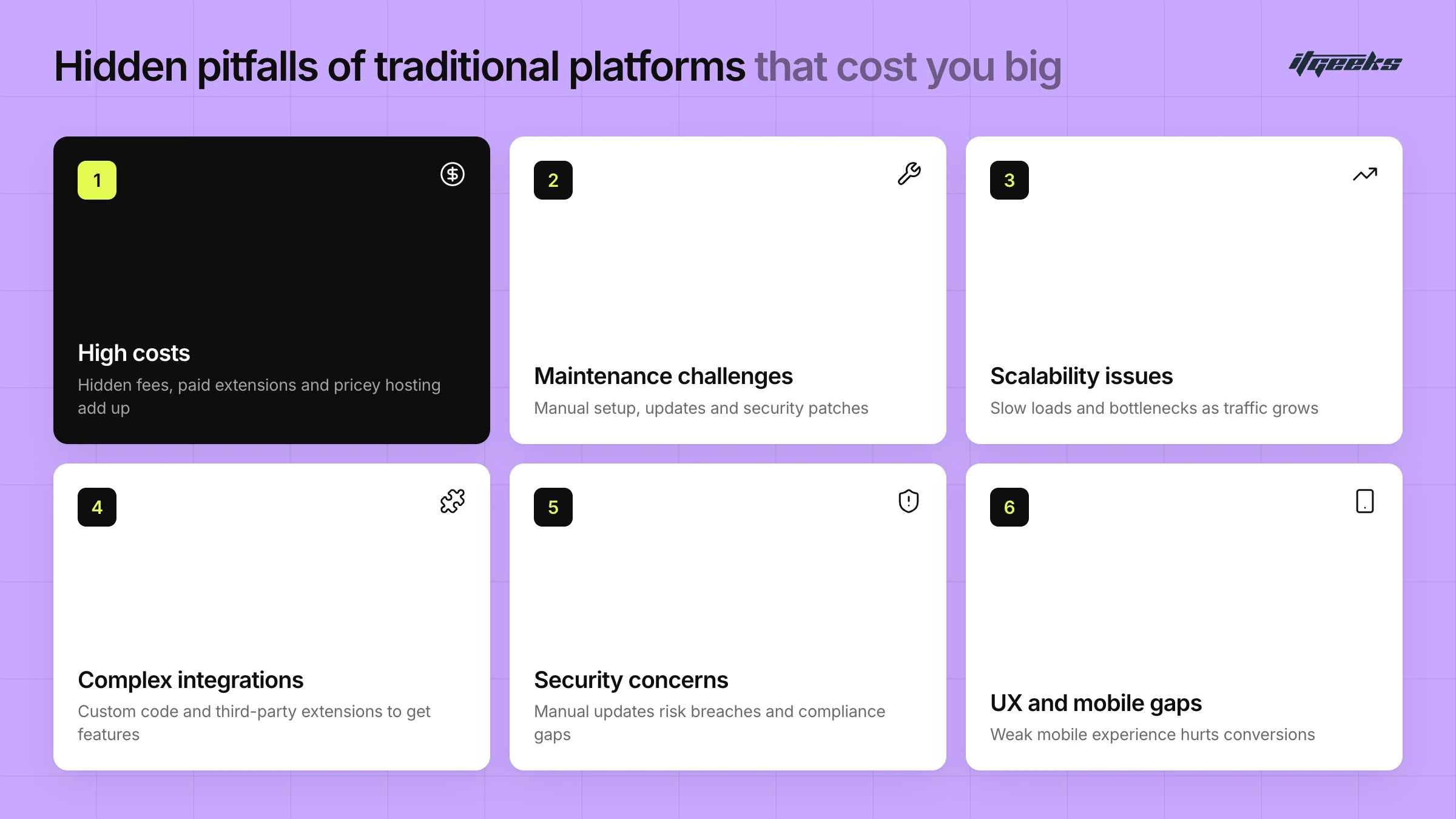
While platforms like BigCommerce, WooCommerce, and Magento are popular, they come with their own set of limitations that impact scalability, customization, and overall user experience. Common issues with traditional e-commerce platforms are:-
1. High Costs & Pricing Complexities
Many platforms charge hidden fees or implement revenue-based pricing structures, which increases operational expenses as your business grows. While some platforms may seem budget-friendly initially, the need for paid extensions, higher transaction fees, or expensive hosting solutions quickly adds up, making scaling costly.
2. Technical Expertise & Maintenance Challenges
Self-hosted and open-source platforms often require manual setup, frequent updates, and security patches, which demand technical expertise. Without a dedicated team, you must invest in developers or ongoing training, adding to long-term expenses and reducing agility in managing your stores.
3. Scalability Issues & Performance Limitations
As traffic increases, many platforms struggle with slow loading times, performance bottlenecks, or the need for additional server resources to handle growth. Without built-in scalability, you often face downtime, higher infrastructure costs, and technical complexities in optimizing your online store.
4. Complexity in Customization & Integrations
While some platforms offer flexibility, they often require complex coding or third-party extensions to achieve the desired level of customization. This not only increases dependency on developers but also leads to compatibility issues, security risks, and slower implementation of new features.
5. Limited Built-in Features
Many e-commerce solutions require multiple third-party apps or plugins to enable essential functions like multi-channel selling, abandoned cart recovery, and advanced analytics. This creates fragmented systems, leading to higher costs, increased maintenance efforts, and potential functionality gaps.
6. Security & Compliance Concerns
Platforms that require manual security updates put businesses at risk of data breaches and compliance issues. Ensuring PCI-DSS compliance, SSL certification, and regular security audits can be overwhelming, requiring extra resources and constant monitoring.
7. User Experience & Mobile Optimization Gaps
Modern consumers expect fast, mobile-friendly, and seamless shopping experiences. Platforms that lack intuitive design, mobile responsiveness, and built-in optimization tools make it challenging to meet customer expectations, impacting conversion rates and retention.
These limitations directly impact your operations, leading to a less personalized shopping experience, higher operational costs, and potential inefficiencies. The bottom line?
Your e-commerce platform should fuel your growth, not hold you back. If any of these pain points sound familiar, maybe it’s time to consider a smarter, more scalable alternative.
Shopify: The Ultimate Powerhouse for Ecommerce.
In the evolving world of e-commerce, Shopify stands out as a game-changer, offering
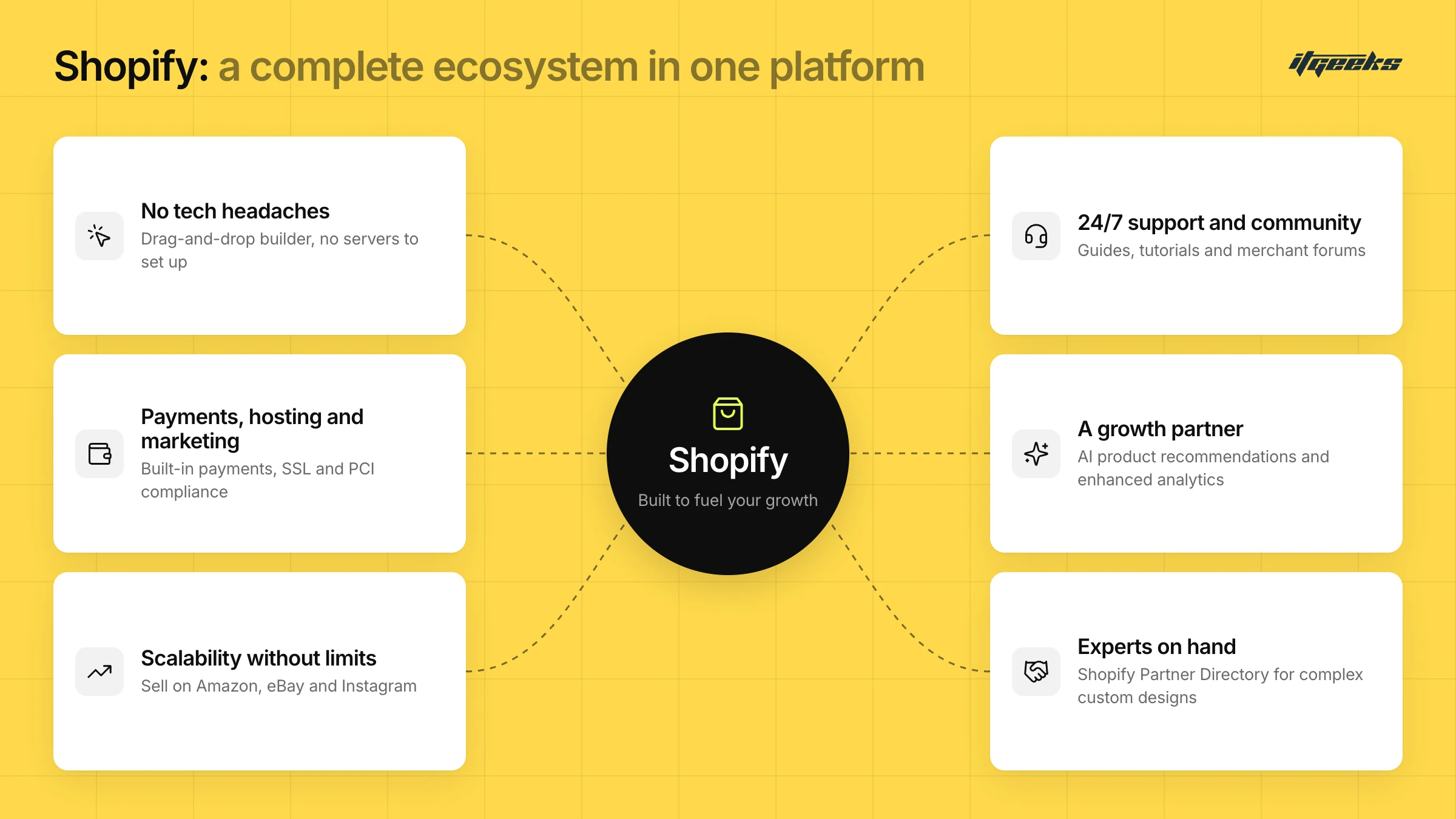
1. No Tech Headaches!
Shopify removes the need for coding or technical expertise. No more setting up servers, installing software, or troubleshooting glitches. With its intuitive drag-and-drop builder, anyone can create a professional store with ease, allowing businesses to focus on growth rather than technical complexities. For complex custom designs, you can collaborate with experts from the Shopify Partner Directory to bring your vision to life seamlessly.
2. Payments, Hosting & Marketing: All at One Platform!
Shopify simplifies operations by integrating essential business functions. For example, it's built-in payment processing eliminates the need for third-party gateways, while secure hosting ensures automatic updates, SSL certificates, and PCI compliance.
From SEO tools to email campaigns, Shopify’s marketing solutions help drive traffic and increase conversions, saving time and reducing costs on external services.
One thing to check before you plan around it: Shopify Payments is only available to online stores in certain countries and regions. If it is not available in your market, you activate a supported third-party payment provider instead, so confirm this early in your migration plan.
3. Scalability Without Limits
Whether managing a small inventory or a large-scale enterprise, Shopify’s infrastructure seamlessly adapts to business growth. Advanced tools like automation, analytics, and multi-channel selling enable effortless expansion. With integrations across platforms like Amazon, eBay, and Instagram, Shopify ensures smooth performance, even during peak sales periods, eliminating the risk of slowdowns.
4. 24/7 Customer Support & a Thriving Community
Round-the-clock customer support means help is always available, no matter the time zone. Shopify provides extensive resources, including blogs, guides, and tutorials, empowering store owners to maximize their platform’s potential.
Additionally, its vast community of merchants and experts offers insights and support through forums and social media, ensuring businesses never feel isolated.
5. More Than Just a Platform - A Growth Partner
Shopify continuously evolves, introducing innovations like AI-driven product recommendations, dynamic checkout, and enhanced analytics. Seamless app integrations expand marketing, customer service, and automation capabilities. Advanced reporting tools provide real-time insights, enabling data-driven decision-making.
Simply put, Shopify is more than just an e-commerce platform, it’s a complete ecosystem designed to help businesses thrive in the digital age.
Effortless Shopify Migration Starts with Smart Planning!
Migrating your store to Shopify?
Great choice!
But let’s be honest, migration isn’t just about copying and pasting your products from one platform to another. It’s a complex process that requires careful planning and execution to ensure minimal disruption and maximum efficiency. A poorly managed migration can lead to unexpected downtime, broken links, lost data, and even a drop in search rankings, all of which can negatively impact sales and customer trust.
From safeguarding your customer data and preserving SEO rankings to ensuring a smooth user experience, every detail matters. Without a well-structured roadmap, you might encounter technical hurdles that slow down your business. That’s why having a strategic migration plan is essential, to not only make the transition smooth and stress-free but also to align the process with your long-term business goals, ensuring sustainable growth on Shopify
From here, there are two paths to take, each with its pros and cons:
DIY Migration
Migrating your e-commerce store to Shopify can be a game-changer, but only if done correctly. A well-planned migration ensures minimal disruptions, retains SEO rankings, and keeps customers happy. Let’s dive into the essential steps involved in the process
Step 1: Data Migration
Your store’s data is its backbone, and transferring it efficiently is key to a successful migration. Here’s how to do it right:
Structured Data Transfer: Use a systematic approach to migrate products, inventory, and customer records
Secure Customer Data: Ensure compliance with data protection regulations to maintain customer trust.
Validate Imported Data: Before going live, verify the accuracy of historical sales, product descriptions, and customer details to avoid errors post-migration.
Step 2: Setting Up Your Shopify Store
Once the data is safely migrated, it’s time to set up your Shopify store:
Choose & Customize a Theme: Select a Shopify theme that aligns with your brand identity and enhances user experience.
Install Essential Apps: Optimize functionality with plugins for payments, analytics, and customer engagement.
Test Everything: Run thorough quality checks, including payment processing, mobile responsiveness, and page loading speeds, to ensure a seamless shopping experience.
Step 3: Redirecting Traffic and SEO Considerations
Preserving your SEO rankings and avoiding traffic loss is crucial during migration. Here’s how to keep your store visible:
Implement 301 Redirects: Redirect old URLs to corresponding Shopify pages to prevent broken links and maintain search engine rankings.
Optimize SEO Elements: Ensure meta tags, descriptions, and keyword-rich content are correctly transferred.
Monitor Post-Migration Performance: Use Google Analytics and Shopify’s built-in tools to track traffic trends, identify dips, and address any migration-related issues promptly.
What Data Can You Migrate to Shopify?
You can migrate products, customers, historical orders, gift cards and store credit, blogs, and pages to Shopify. Use CSV files for products and customers, a migration app from the Shopify App Store for most data types, a Shopify Partner for the whole job, or a custom build on the Shopify API.
The order matters. Per Shopify’s migration guidance, import products first, then customers, then historical orders, so records link to each other correctly. A few practical points:
Mind the CSV limits: a product CSV import cannot exceed 15 MB, so split large catalogues into several files. Sorting the file in a spreadsheet editor can break the links between products and images, so keep a backup export.
Check every variant: products with missing variant options can fail to import and may need to be added manually.
Pause order emails: staff who receive new-order notifications get an email for every imported order, so switch these off before importing orders and back on afterwards.
How Do You Keep Your SEO Rankings When Migrating to Shopify?
Map every old URL to its new Shopify URL, set up 301 redirects before you switch your domain, and prioritise your highest-traffic pages first. Then submit your sitemap to Google Search Console and monitor the old and new URLs after launch. Expect some ranking movement while Google recrawls the new site.
Old URLs usually change on Shopify, because collections, products and pages use fixed paths such as /collections/ and /products/. Some details worth knowing:
Build the redirect map first: Google’s site move guidance recommends mapping every old URL to its new counterpart, pointing each one directly at its final destination, and avoiding sending many old URLs to one unrelated page such as the home page.
Import redirects in bulk: in Shopify admin, URL redirects can be imported by CSV under Content > Menus. A store can hold up to 100,000 redirects, and Shopify Plus stores up to 20,000,000.
Remember how redirects behave: they only work on URLs that return an error such as a 404, and some fixed paths cannot be redirected.
Keep them long term: Google advises keeping redirects in place for at least a year.
Check your sitemap and store access: your store must be out of password protection for search engines to read your sitemap at yourdomain.com/sitemap.xml. Indexing can take a few days to a few weeks.
For a deeper look, read our guide on how to maintain SEO rankings during a Shopify Plus migration, or the common Shopify Plus migration mistakes to avoid.
Your Go-Live Checklist for a Shopify Migration
Before going live, confirm that products, shipping, taxes and payments are set up and tested with test orders, that redirects work, and that your domain is connected correctly. This checklist condenses the steps in Shopify’s migration guide:
Verify products: check prices, weights, inventory, images and variants, and set up collections.
Set up shipping, taxes and payments before launch, so customers are not overcharged or undercharged.
Place test orders: test successful and failed payments, refunds, cancellations and fulfilment, and review the customer notification emails.
Add staff accounts with individual logins and limited permissions.
Connect your domain: disconnect it from your old platform first to avoid SSL errors, then connect it in Shopify. DNS changes can take up to 48 hours to be fully live.
Check redirects after launch: visit your most-visited old URLs and confirm they land on the right new pages.
If your theme choice is still open, our guide on how to choose the perfect Shopify theme can help.
Final Thoughts
A seamless migration to Shopify ensures your store remains functional, SEO-friendly, and ready to scale. By following these steps, you can transition, but as the word itself says, do it on your own. A Slight mistake can cost you your store. Migrating smoothly without disrupting your business operations needs expert guidance?
ITGeeks Way: The Experts Way!
A Seamless Ecommerce Transformation
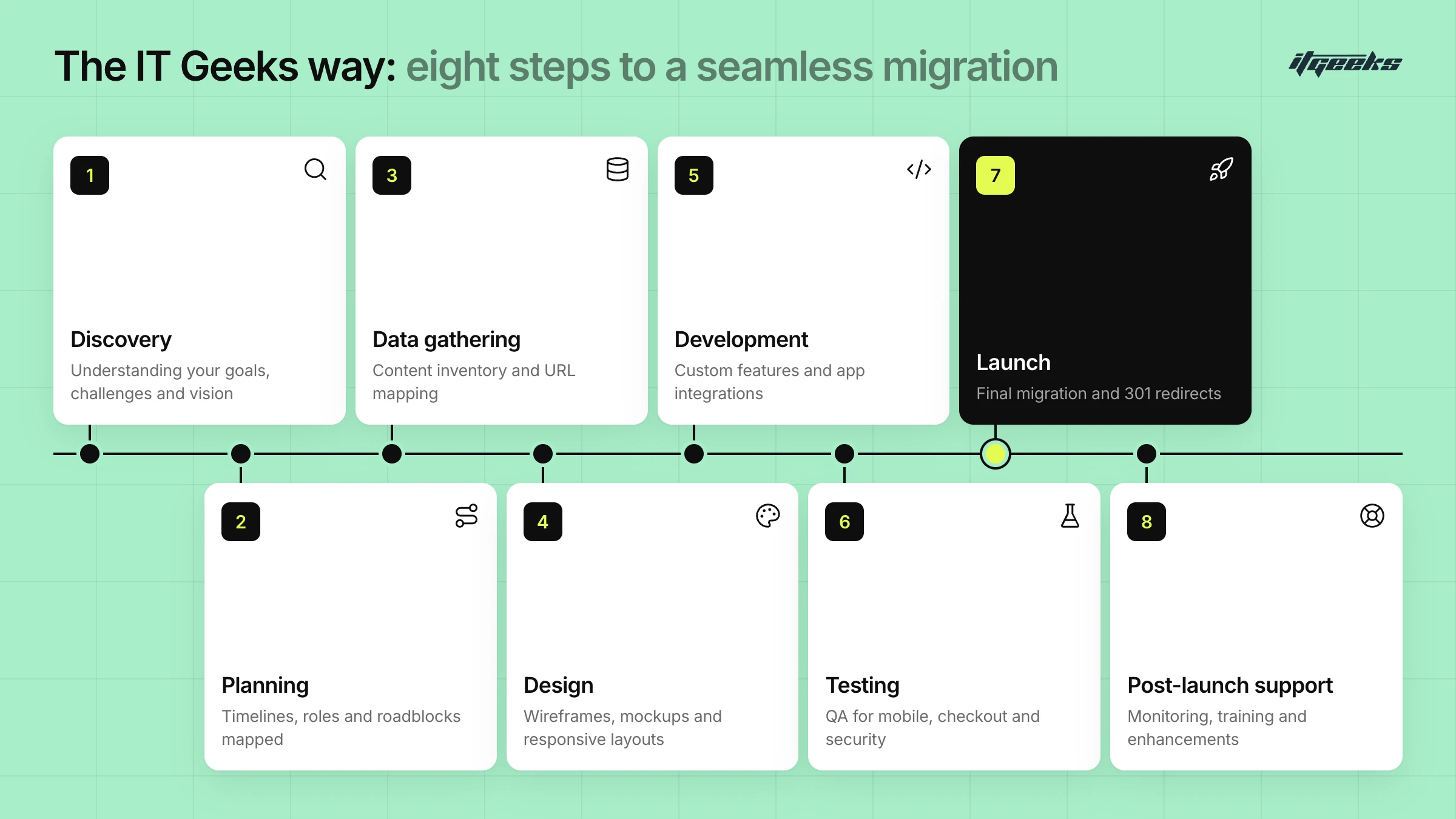
Migrating or building an e-commerce store isn’t just about flipping a switch. It’s a structured journey that ensures your business runs smoothly, efficiently, without hiccups. At ITGeeks, we follow a meticulously planned approach to deliver a seamless, optimized, and future-proof e-commerce experience. Here’s how we make it happen:
1. Discovery: Understanding Your Needs
Before diving into development, we take a deep dive into your business, understanding your goals, challenges, and vision. We analyze your current platform, customer experience, and business objectives to craft a strategy that aligns with your needs.
Why It Matters:
Identifies pain points and opportunities
Sets clear expectations for project scope
Ensures the migration or build meets your business goals
2. Planning: Creating a Roadmap for Success
A solid plan is the foundation of every successful project. We outline the entire process, set realistic timelines, assign responsibilities, and anticipate potential roadblocks. Our team ensures that every detail is accounted for to minimize disruptions.
Why It Matters:
Prevents unexpected challenges during migration
Keeps the project on track and within budget
Defines roles and responsibilities for efficiency
3. Data Gathering: Preparing for a Smooth Transition
Your data is the backbone of your store, and we ensure nothing is left behind. We conduct a comprehensive content inventory, mapping product listings, customer databases, and orders for a seamless transition. To protect your SEO rankings, we align existing URLs with new Shopify URLs, prioritizing high-performing pages and keywords.
We outline essential features like product filters, search functionality, and custom pages while gathering design preferences for colors, fonts, and layout. With competitor insights and meticulous planning, we ensure a smooth, optimized migration.
Why It Matters:
Preserves critical business information
Avoids data loss or discrepancies
Ensures seamless transition without downtime & SEO loss.
4. Design: Crafting a User-Centric Experience
Your store’s design is more than aesthetics, it’s about user experience. Customize your Shopify store with a visually appealing, mobile-responsive, and conversion-optimized design that aligns with your brand identity and enhances customer engagement. Our process seamlessly transitions from wireframing and theme selection to mockups and responsive design, keeping you actively involved at every stage.
Why It Matters:
Boosts customer trust and retention
Enhances navigation and shopping experience
Increases conversions with an intuitive interface
5. Development: Bringing the Vision to Life
Once the design is finalized, our development team brings it to reality. Whether it’s custom functionalities, app integrations, or seamless third-party connections, we build a store that not only looks great but performs flawlessly.
Why It Matters:
Optimizes store functionality for scalability
Enhances performance for fast load times
Ensures seamless integration with business tools
6. Testing: Ensuring a Bug-Free Experience
Before launch, we rigorously test every aspect of your store. From checking mobile responsiveness to ensuring a smooth checkout experience, our QA team runs multiple tests to guarantee a frictionless shopping experience.
Why It Matters:
Eliminates technical glitches before launch
Ensures cross-device compatibility
Enhances security and data protection
7. Launch: Making It Live with Confidence
The moment of truth! We execute the final migration, implement 301 redirects for SEO preservation, and conduct a final review before making your store live. Our team ensures a seamless transition with minimal downtime.
Why It Matters:
Prevents disruptions to your business
Maintains SEO rankings during migration
Guarantees a smooth transition for customers
8. Post-Launch Support: We’ve Got Your Back!
Our job doesn’t end at launch! We provide ongoing support, performance monitoring, and training to ensure your store runs efficiently. Whether you need enhancements, troubleshooting, or strategic guidance, ITGeeks is here for you.
Why It Matters:
Ensures continuous store optimization
Helps you leverage new features and updates
Provides long-term growth strategies
At ITGeeks, we don’t just migrate stores, we build scalable, high-performing e-commerce experiences that empower businesses to thrive. Ready to make the move? Let’s get started on your seamless Shopify transformation today!
With ITGeeks by your side, your Shopify store isn’t just migrated, it’s set up for long-term success!
DIY vs. Hiring Experts
Sure, you could attempt to migrate your store on your own, but is it really worth the risk? DIY migration often seems cost-effective at first, but it comes with major challenges that impact your store’s performance. You may encounter:
Data loss, where critical customer information, order history, or product details don’t transfer correctly.
SEO drops are another common issue, without proper redirections and SEO structuring, your store may lose its hard-earned search rankings, affecting visibility and traffic.
Broken functionalities disrupt the shopping experience, leading to abandoned carts and lost revenue.
On the other hand, hiring Shopify migration experts ensures a seamless and optimized migration with zero downtime. Professionals follow a structured approach, preserving your data integrity, maintaining your SEO rankings, and ensuring all store functionalities work flawlessly. With extensive experience migrating countless stores, experts handle complex challenges, saving you time and effort.
Instead of troubleshooting errors, you can focus on growing your business while professionals take care of a hassle-free transition to Shopify.
Still weighing it up? Our guide to choosing the right Shopify migration agency explains what to look for, and you can see how we work on our Shopify migration services page.
Why ITGeeks as Your Migration Expert?
Migrating to Shopify is a crucial step in scaling your e-commerce business, and having the right partner can make all the difference. At ITGeeks, we specialize in seamless Shopify migrations, ensuring minimal disruption to your business while maximizing the benefits of the platform.
What Sets ITGeeks Apart?
Expertise in Shopify Migration: Our team has successfully migrated numerous businesses to Shopify, handling everything from data transfer to SEO preservation.
Tailored Solutions: We understand that every business is unique, so we customize migration strategies to meet your specific needs.
Seamless Transition: With meticulous planning and execution, we ensure that your store experiences no downtime or data loss during the migration.
Post-Migration Support: Our job doesn’t end after the migration. We provide ongoing support to help you optimize and scale your Shopify store.
Proven Track Record: As a trusted Shopify Platinum Partner, we have helped businesses of all sizes unlock Shopify's full potential.
Shopify Migration Guides by Platform
The details of a migration depend on where you are moving from. We have dedicated pages for each source platform:
If you're ready to migrate to Shopify and want expert guidance, ITGeeks is here to help. Let’s make your transition smooth, efficient, and successful. Contact us today!