


WooCommerce to Shopify Migration: Everything you need to know!
In short: to migrate from WooCommerce to Shopify, back up and clean your WooCommerce data, import products first, then customers, then order history, rebuild your theme, apps, payments and shipping, map every old URL to a new one with 301 redirects, test checkout, and only then switch your domain. Customer passwords cannot be migrated, so plan for customers to set new ones.
Starting an online business is an exciting journey, and choosing the right platform is one of the most crucial decisions you will make. WooCommerce might seem like a feasible choice at first due to its flexibility and seamless integration with WordPress. However, as you scale and demands grow, WooCommerce often presents challenges that make it more of a liability than an asset. Issues with performance, security, maintenance, and scalability become increasingly apparent, making it difficult for business owners to focus on expansion and customer experience.
And that’s One Crack in the Dam. Managing WooCommerce requires constant updates, plugin management, and security monitoring, which is time-consuming and technically demanding. Furthermore, hosting costs escalate as traffic increases, and the need for performance optimization becomes critical. Unlike fully hosted solutions like Shopify, WooCommerce relies on external plugins for crucial functionalities, which lead to compatibility issues, site slowdowns, and potential disruptions.
And that’s where a journey to look for an alternative platform begins.
Let’s look at the process in detail, starting with the most important question -
What is Migration?
Migration refers to the process of transferring an online store from one platform to a more advantageous one while ensuring minimal disruptions to business operations. This transition is crucial for businesses looking to enhance their store’s performance, scalability, and overall efficiency. Migration involves moving essential store data such as products, customer information, order history, content, and design elements from the existing platform to the new one, like from WooCommerce to Shopify, all while preserving data integrity and ensuring a seamless shopping experience for customers.
Switching platforms is not just about transferring data, it’s about optimizing your business for growth. A successful migration ensures that your store not only retains its core functionalities but also gains improved speed, security, and user experience. Businesses migrate when they outgrow their current platform’s capabilities, encounter limitations in customization, or struggle with high maintenance costs. Ensuring a smooth migration is essential to prevent any revenue loss, minimize downtime, and maintain SEO rankings.
That’s where Shopify steps in as a powerful alternative. As a fully hosted, cloud-based eCommerce platform, Shopify simplifies the migration process by offering built-in tools and expert support to ensure a smooth transition. With Shopify, you can enjoy robust security, seamless integrations, automated updates, and a highly scalable infrastructure that grows with your needs. By migrating to Shopify, you gain access to a world-class ecosystem that enables them to focus on innovation, customer experience, and long-term success.
Before making the leap to a new platform
It's crucial to understand the limitations of traditional eCommerce platforms to see the bigger picture.
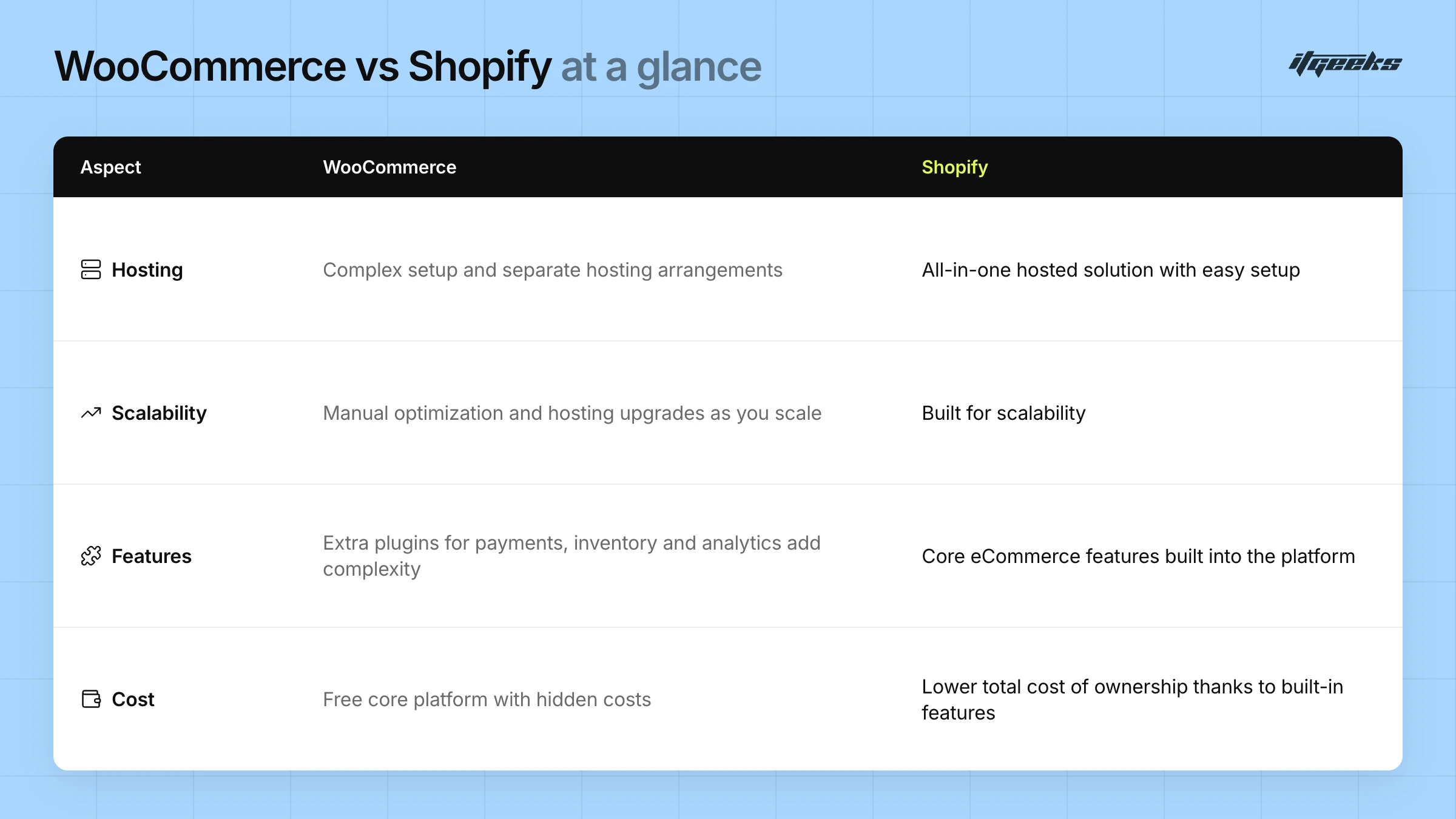
Before transitioning, it’s essential to acknowledge WooCommerce’s drawbacks and why they are restricting your business growth.
Scalability Challenges
WooCommerce requires frequent hosting upgrades as traffic increases, leading to higher operational costs and complex management. The more visitors and orders you handle, the more server resources you need, making scaling cumbersome.
Security Concerns
Being an open-source, self-hosted platform, WooCommerce places the burden of security entirely on you. Regular updates, firewall setups, and vulnerability patches are necessary to prevent cyber threats.
Plugin Overload
Every additional feature in WooCommerce requires a plugin, which leads to conflicts, slow page loading times, and higher bounce rates. Shopify eliminates this issue with built-in features and optimized apps.
Expensive Customizations
While WooCommerce itself is free, premium themes, paid plugins, and developer costs quickly add up, making it an expensive choice for businesses looking to scale.
Frequent Maintenance Requirements
WooCommerce updates often require manual intervention, potentially breaking existing plugins and themes, leading to unexpected downtime.
Lack of Dedicated Support
Unlike Shopify, which provides its own support channels, WooCommerce users must rely on community forums, their hosting provider or third-party developers for assistance, which can be time-consuming and unreliable.
Performance Issues
WooCommerce stores may suffer from slow loading speeds, especially when using multiple plugins or poorly optimized hosting, negatively impacting user experience and SEO rankings.
Complex Checkout Process
WooCommerce’s default checkout flow can be cumbersome, requiring additional plugins to optimize it for better conversions, whereas Shopify offers a streamlined, high-converting checkout experience out of the box.
Should You Switch from WooCommerce to Shopify?
You should switch if you are spending more time on hosting, updates, plugin conflicts and security than on selling, or if your store is outgrowing its server, theme or checkout. If you rely on deep WordPress-specific publishing or want full control of your own server, WooCommerce may still suit you.
These signs usually mean it is time to move:
Page speed drops when traffic spikes or when you add another plugin.
Updates regularly break a plugin, a theme or your checkout.
Hosting, paid plugins and developer time keep adding to your running costs.
You want to sell in more regions, add B2B or wholesale, or automate operations without custom code.
If you are comparing platforms more widely, read our guide to Shopify vs. other e-commerce platforms. If you are unsure whether you need the Plus plan, see whether Shopify Plus is the right fit for your business.
What Makes Shopify Plus a Scalable Solution?
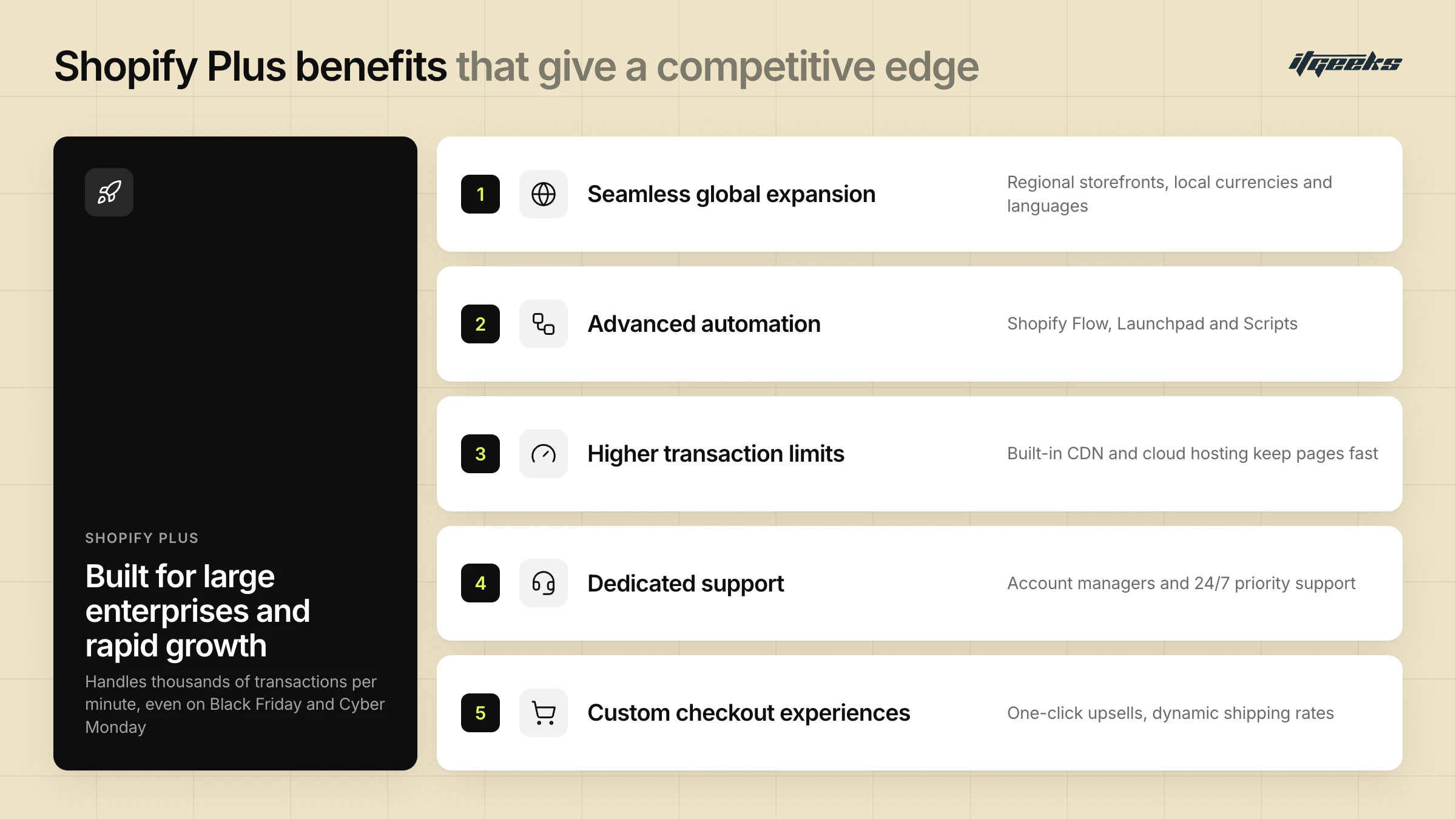
Shopify Plus is designed for large enterprises and businesses experiencing rapid growth. It offers advanced features such as increased customization options, higher transaction limits, and enhanced automation capabilities, allowing you to scale effortlessly. Whether you’re handling thousands of orders daily, expanding into global markets, or automating key operations, Shopify Plus provides the tools necessary to support long-term growth while maintaining an optimal shopping experience.
Seamless Global Expansion
With Shopify Plus, you can expand internationally by managing multiple storefronts, each optimized for different regions. This includes localized currencies, languages, and tailored content, ensuring a personalized shopping experience for customers worldwide. The platform also integrates with global payment gateways and tax calculation tools, simplifying cross-border transactions.
Advanced Automation for Efficiency
Shopify Plus offers powerful automation tools to streamline operations, reducing manual workload and improving efficiency. Shopify Flow automates tasks such as order processing and inventory alerts, and Launchpad (available only on Plus) schedules events such as sales, product launches and restocks. Custom discount, shipping and payment logic is now built with Shopify Functions: Shopify Scripts stopped running on June 30, 2026, so any store still relying on old Scripts needs them rebuilt as Functions or replaced with apps. This keeps campaigns and promotions running without constant manual intervention.
Higher Transaction Limits & Performance Optimization
Unlike traditional eCommerce platforms that struggle with high-volume traffic, Shopify Plus is built for reliability when demand spikes, including peak sales events like Black Friday or Cyber Monday. Shopify’s hosted infrastructure, including its content delivery network (CDN), keeps website loading speeds fast, minimizing cart abandonment and improving customer satisfaction.
Dedicated Support & Account Management
One of the standout features of Shopify Plus is its premium support and personalized assistance, which gives you expert guidance on store optimization, technical troubleshooting, and business growth strategies. This helps resolve issues promptly and minimizes downtime.
Custom Checkout Experiences
Advanced checkout customization is available only on the Shopify Plus plan. Plus stores can use eligible apps to customize the information, shipping and payments steps, and use the Checkout Branding API to match checkout to their brand. Together with Shopify Functions for discounts, shipping and payment rules, this allows a more intuitive and frictionless checkout experience, ultimately improving customer retention and increasing revenue.
By combining these advanced features, Shopify Plus empowers you to scale efficiently, optimize operations, and provide an exceptional customer experience, making it the ideal solution for brands aiming for long-term growth.
But Can You Migrate Easily?
Migrating from WooCommerce to Shopify is easier than many of you assume, but it does require careful planning and execution to ensure a smooth transition. The process involves transferring crucial store data while maintaining SEO rankings, preserving customer history, and ensuring minimal disruptions to business operations. With the right approach, you can successfully move to Shopify without losing important data or functionality.
You can migrate -
Product Details
You can migrate your entire product catalog, including product names, descriptions, high-resolution images, SKUs, pricing, stock levels, and categories. Shopify supports bulk product imports, making it easy to transition large inventories efficiently.
Customer Data
All essential customer details such as names, email addresses, phone numbers, shipping addresses, and order history can be transferred to Shopify. This ensures that your returning customers retain their purchase records and account details, allowing for a seamless shopping experience post-migration.
Orders & Transaction History
Your store’s past orders, invoices, payment details, and fulfillment records can be migrated to Shopify for record-keeping and analytics. This allows you to continue tracking sales trends, customer purchase behavior, and business performance without starting from scratch.
SEO & URLs (With Proper Redirects)
To maintain your search engine rankings and traffic, you can implement 301 redirects for your old URLs, ensuring that customers and search engines are directed to the correct pages on your new Shopify store. Migrating metadata, alt text, and structured data also helps maintain your site’s visibility on search engines.
What does not migrate automatically
Some WooCommerce data needs extra work or a third-party app. According to Shopify’s WooCommerce migration guide (checked October 2026):
Customer passwords cannot be migrated. Customers sign in with a one-time code sent to their email, and legacy account holders create a new password.
Order history cannot be imported by CSV. It needs a third-party migration app or the Shopify API.
Coupons, blog posts and pages are not in WooCommerce’s standard exports. Recreate them in Shopify or use a migration app.
Product reviews need a third-party app.
Product categories have no direct match. Import them as tags, then build collections from those tags.
Products with many attributes may lose their variants. Shopify’s Store Migration app supports a maximum of three product options.
How to protect your SEO rankings during migration
Rankings are protected by mapping every old URL to its closest new Shopify URL with a permanent redirect. Google recommends 301 or 308 redirects, pointing each old URL straight to its new equivalent rather than to the homepage, and keeping them in place for as long as possible, at least a year.
List every old URL from your sitemap, analytics and Google Search Console, including product, category, blog and image URLs.
Import the redirects in Shopify (Content > Menus > View URL Redirects) before you switch your domain.
After launch, test your most-visited old URLs and watch Search Console for errors.
Expect some temporary ranking movement while Google recrawls the new site.
Google explains this in its guide to site moves with URL changes. For a deeper walkthrough, read our guide to maintaining SEO rankings during a Shopify Plus migration.
Effortless Migration from WooCommerce to Shopify in 5 simple Steps -
Migrating from WooCommerce to Shopify involves a structured and strategic process to ensure a seamless transition with minimal disruptions to business operations. Since your online store contains vital data such as products, customer records, order history, and SEO settings, careful planning is essential to ensure everything is transferred accurately.
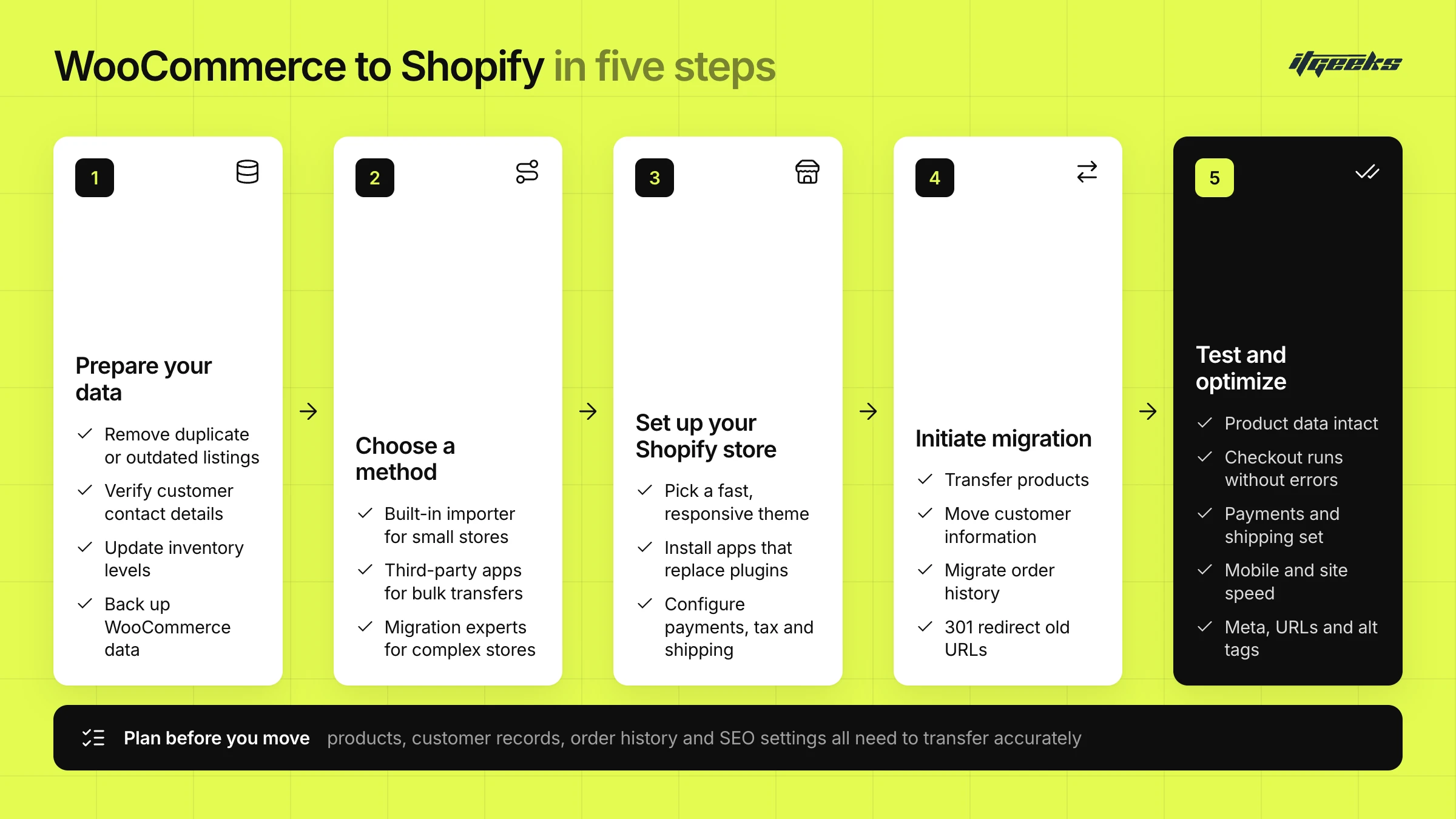
Step 1: Prepare Your Data
Before initiating the migration, ensure that all product listings, customer records, and order details are up-to-date, accurate, and well-organized. This includes:
Removing duplicate or outdated product listings.
Verifying that customer contact details are correct.
Checking that inventory levels are updated to prevent discrepancies post-migration.
Backing up your WooCommerce data to prevent any loss during the transfer.
Exporting a list of all current URLs, so you can build your redirect map later.
Step 2: Choose a Migration Method
Depending on your store’s size and complexity, you can choose from multiple migration methods:
Shopify's Built-in Importer: Shopify’s free Store Migration app imports WooCommerce products and customers from CSV files, which makes it ideal for small stores with simple product catalogs and minimal customizations.
Third-Party Migration Tools: Third Party Apps can simplify data transfer by handling bulk migrations efficiently, including order history, reviews, coupons, blog posts and pages that CSV imports cannot cover.
Professional Migration Services: For complex stores with custom features, working with Shopify migration experts ensures accurate data transfer with minimal downtime.
Step 3: Set Up Your Shopify Store
Before migrating your data, configure your Shopify store settings to match your business needs.
Select a Shopify Theme: Choose a responsive, fast-loading, and visually appealing theme that aligns with your brand.
Install Essential Apps: Identify Shopify apps that replace WooCommerce plugins for SEO, analytics, payment processing, and marketing automation.
Configure Payment & Shipping Settings: Set up your payment gateways, tax settings, and shipping options to align with your business model.
Step 4: Initiate Migration
Once your Shopify store is ready, proceed with data migration using your chosen method. Import in this order so records link correctly: products first, then customers, then historical orders. Keep your WooCommerce store online until the import finishes, because Shopify downloads product images from their existing URLs.
Transfer Products: Migrate all product details, including names, descriptions, images, categories, and pricing.
Move Customer Information: Import customer details such as names, emails, shipping addresses, and purchase history to maintain seamless customer relationships.
Migrate Order History: Ensure past orders are transferred accurately for record-keeping, analytics, and customer support continuity.
Redirect Old URLs: Implement 301 redirects from old WooCommerce URLs to corresponding Shopify URLs to maintain SEO rankings and prevent broken links.
Step 5: Test & Optimize Your Store
After migration, perform thorough testing to confirm that:
All product data is intact and correctly displayed.
Checkout processes function smoothly without errors.
Payment gateways and shipping options are correctly configured.
Mobile responsiveness and site speed are optimized for the best user experience.
SEO elements, including meta descriptions, URLs, and alt tags, are properly set up.
Old URLs redirect to the right pages, and your domain is disconnected from WooCommerce before you connect it to Shopify, which avoids SSL certificate errors.
A well-executed migration ensures that your customers experience a seamless transition without disruptions in their shopping journey.
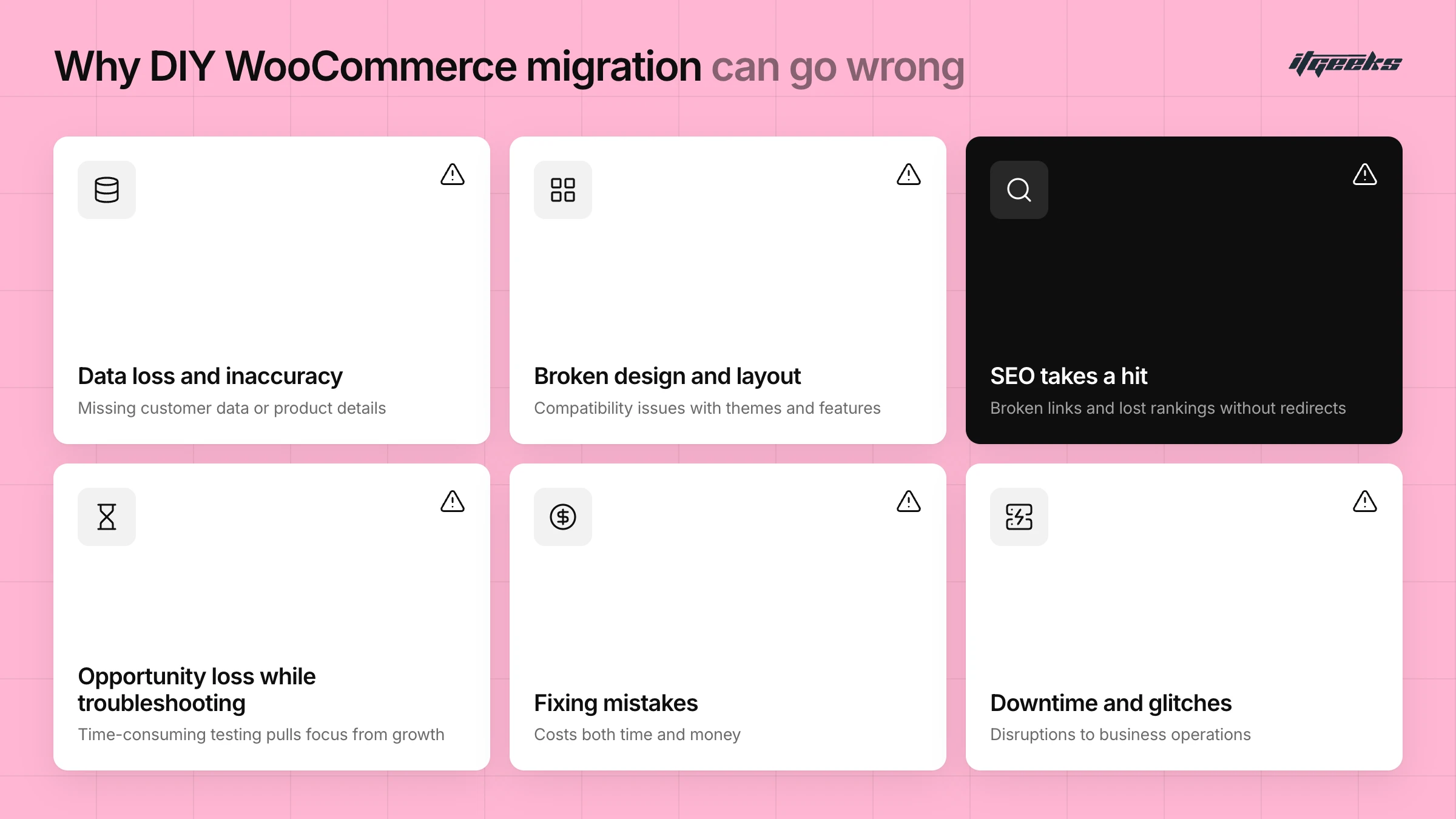
The Best Way to Migrate is the Expert’s Way! Always!
Migrating from WooCommerce to Shopify might seem straightforward, but the process involves several critical steps that, if not handled correctly, can lead to data loss, downtime, or SEO issues. Ensuring a seamless transition requires careful planning, accurate data transfer, and post-migration optimization. While a DIY approach is possible using migration tools, it often comes with challenges such as compatibility issues, broken links, or missing customer data. To avoid these risks and ensure a hassle-free migration, working with experienced Shopify migration experts is the best way to transition your store smoothly and efficiently. You can also read about the most common Shopify Plus migration mistakes to avoid, or how to choose the right Shopify migration agency.
Technical expertise -
Migration experts have years of experience handling complex store migrations, including transferring large product catalogs, managing customer data, and recreating custom features or integrations that may not be directly compatible with Shopify.
They ensure that all critical data such as product listings, customer information, order history, and SEO settings are transferred accurately without disrupting your business operations.
Time efficiency -
Migrating from WooCommerce to Shopify manually can be time-consuming, requiring extensive testing and troubleshooting.
Professionals streamline the process by efficiently handling all technical aspects, minimizing downtime, and ensuring that your store remains operational throughout the migration. This allows business owners to focus on growing their brand rather than dealing with migration complexities.
Optimization -They fine-tune store settings, implement best SEO practices, improve site speed, and ensure mobile responsiveness to create an enhanced user experience.
Additionally, they assist in setting up Shopify apps to replace WooCommerce plugins, ensuring that all essential functionalities continue to operate smoothly.
Migrating from WooCommerce to Shopify can be a game-changer for your business, offering better scalability, security, and ease of use. While the transition may seem daunting, the right approach combined with expert guidance makes it a smooth and rewarding experience. By trusting professionals with the migration process, you can focus on growing your business while ensuring your store operates seamlessly on Shopify.
WooCommerce to Shopify Migration FAQs
Can I migrate from WooCommerce to Shopify without losing SEO rankings?
Yes, you can protect most of your rankings if every old URL is redirected with a 301 to its closest new Shopify URL, and your titles, meta descriptions, headings and image alt text are carried over. Some temporary ranking movement is normal while Google recrawls your new site. Test your redirects before and after launch.
Do customer passwords migrate from WooCommerce to Shopify?
No. Shopify states that customer passwords can’t be migrated. Customers with accounts sign in using a one-time code sent to their email, and legacy account holders create a new password. Tell customers about the change before launch so they are not surprised.
Can I migrate my WooCommerce order history to Shopify?
Yes, but not with a CSV file. Shopify cannot import orders by CSV, so you need a third-party migration app or the Shopify API. Import products and customers first so each historical order links to the right records.
Do I need Shopify Plus to migrate from WooCommerce?
No. The migration steps are the same whichever Shopify plan you choose. Shopify Plus adds capabilities such as advanced checkout customization and Launchpad, which are available only on Plus, so it suits high-volume or complex stores. If you are weighing it up, see our Shopify migration services.
Who can migrate my WooCommerce store to Shopify?
You can migrate it yourself with Shopify’s Store Migration app or a third-party app, hire a Shopify Partner, or build a custom solution with the Shopify API. These are among the options Shopify lists. Complex stores with custom features, large catalogs or many redirects usually benefit from a Shopify Platinum Partner such as ITGeeks.
ITGeeks: Your Trusted Shopify Platinum Partner
As ITGeeks, we are a Shopify Platinum Partner working in ecommerce since 2015, helping you succeed in the ever-evolving e-commerce landscape. With a strong focus on scalable store migrations, innovative custom app development, and performance-driven marketing strategies, we have supported 10,000+ brands. Our expertise lies in delivering seamless transitions that enable you to grow, scale, and maximize your online potential.
As a next-gen digital transformation company, we specialize in all four key pillars of e-commerce success: Design, Develop, Migrate, and Market. Working in ecommerce since 2015, with a team of 250+ skilled professionals, and a proven track record of executing flawless migrations, we ensure that your transition from WooCommerce to Shopify is smooth, efficient, and hassle-free. Our deep understanding of Shopify’s ecosystem allows us to tailor solutions that align with your unique business needs while optimizing performance, security, and scalability.
By choosing ITGeeks as your migration partner, you gain access to expert guidance, cutting-edge technology, and personalized support that set your business up for long-term success. Don't let platform limitations hold you back, contact ITGeeks today and take the first step toward a future-proof, scalable e-commerce solution.