


Introduction:
In short: a Shopify store transition is the planned move of your products, customers, orders, content, theme, apps and URLs onto a new Shopify setup, whether you are coming from another platform or restructuring an existing Shopify store. To protect traffic and sales, audit and back up first, import data in the right order, map every old URL to a new one with 301 redirects, test thoroughly and monitor search performance after launch.
E-commerce has witnessed a remarkable evolution over the years, transforming the way businesses connect with consumers and conduct transactions. In this dynamic landscape, adaptability is key, and one platform that has played a pivotal role in empowering businesses is Shopify. As the e-commerce terrain continues to evolve, the ability to navigate Shopify store transitions becomes increasingly crucial for online retailers seeking sustained success.
The Overview of E-Commerce Evolution sets the stage by highlighting the significant shifts in the digital marketplace. From the early days of basic online storefronts to the current sophisticated e-commerce ecosystems, understanding this evolution provides valuable context for businesses looking to thrive in the ever-changing online retail landscape.
The Importance of Navigating Shopify Store Transitions delves into the specific role that Shopify plays in the modern e-commerce environment. With its user-friendly interface, robust features, and a wealth of customizable options, Shopify has become a go-to platform for businesses of all sizes. However, the success of an online store isn’t just about choosing the right platform. It’s about adapting to changes and leveraging the capabilities of the chosen platform effectively.
In this blog, we will explore the intricacies of transitioning within the Shopify ecosystem. From optimizing your store’s design to integrating new features and adapting to the latest trends, we’ll guide you through the steps to elevate your e-commerce game on Shopify. Join us on this journey as we unlock the potential of seamless transitions and empower your online store for sustained growth.
Understanding Shopify Store Migration
Shopify store migration refers to the process of transferring your online store from one Shopify platform to another, often with the goal of improving performance, adding new features, or addressing existing limitations. The significance of this process lies in its potential to enhance the overall efficiency, functionality, and user experience of your e-commerce store.
In practice, “migration” covers a few situations: moving to Shopify from another platform such as WooCommerce, Magento or BigCommerce; rebuilding or restructuring an existing Shopify store, for example with a new theme or store structure; or moving to a different Shopify plan. Shopify is a hosted platform, so you do not install “versions” of it the way you would with self-hosted software. Where this guide refers to newer versions, read it as newer themes, features, apps and plans.
Key Reasons for Migration
1. Platform Limitations
Shopify, like any other e-commerce platform, may have certain limitations that can hinder the growth and customization of your online store. Common limitations include a lack of specific features, constrained design options, or restrictions on integrating third-party applications. By migrating your Shopify store, you can overcome these limitations and unlock a broader range of possibilities to tailor your store to meet your unique business needs.
2. Enhanced Features and Functionality
Businesses evolve, and so do customer expectations. Migrating your Shopify store allows you to access and implement the latest features and functionalities available on newer versions of the platform. This can include advanced marketing tools, improved inventory management, or better customer engagement features. Staying updated with the latest features ensures that your online store remains competitive and provides an optimal shopping experience for your customers.
3. Better Performance and Security
As your business grows, the demand for better performance and enhanced security becomes crucial. Older versions of Shopify may not be equipped to handle increased traffic, leading to slower loading times and potential disruptions in service. Upgrading to a newer version or migrating to a different plan can significantly improve your store’s performance, ensuring a seamless shopping experience for customers. Additionally, newer versions often come with enhanced security measures, protecting both your business and your customers’ sensitive information from potential threats.
Understanding and carefully considering Shopify store migration is essential for e-commerce businesses aiming to stay competitive in the dynamic online marketplace. Whether overcoming limitations, embracing new features, or improving performance and security, the migration process can be a strategic move to elevate your e-commerce game and meet the evolving needs of your business and customers.
Preparing for Migration: Navigating Shopify Store Transitions
Transitioning your e-commerce store to Shopify requires careful planning and execution to ensure a smooth and successful migration. In this phase, thorough preparation is key. Here are essential steps to take before making the move:
Comprehensive Store Audit:
Before embarking on any migration, conduct a comprehensive audit of your existing e-commerce store. Evaluate your current website structure, product listings, customer data, and design elements. Identify what is working well and what needs improvement. This audit will provide valuable insights into the areas that require special attention during the migration process.
As part of the audit, build an inventory you can check against after launch:
Every indexed URL on the old store, taken from your sitemap, analytics and Google Search Console, with its traffic and backlinks.
Counts of products, collections, pages, blog posts, customers and orders, so you can confirm nothing went missing.
Every app, integration and custom feature, and where its data lives.
Existing redirects, canonical tags, meta titles and descriptions worth carrying over.
Data Backup and Security Measures:
The security of your data is of paramount importance during a Shopify store transition. Prioritize data backup to prevent any loss or corruption during the migration process. Create a robust backup of your product information, customer data, order history, and other critical elements. Additionally, implement security measures to protect sensitive information, such as customer details and financial data, throughout the migration process.
For your theme, duplicate it before making changes (Online Store, Themes, then Duplicate) so you can roll back. Shopify allows up to 20 themes per store, and a downloaded theme does not include products, collections, pages, blog posts or files, so export those separately. See Shopify’s guide to duplicating themes.
Stakeholder Communication:
Effective communication is crucial to managing expectations and ensuring a smooth transition for all stakeholders involved. Keep your team informed about the upcoming Shopify migration, detailing the benefits and potential impacts. If your customers will be affected, communicate the changes well in advance. Provide clear instructions on what they can expect during the transition and how it may impact their experience. This proactive approach will help build trust and reduce any potential friction associated with the migration.
By diligently addressing these three aspects in the preparation phase, you set a solid foundation for a successful transition to Shopify. This proactive approach not only minimizes potential disruptions but also allows for a more efficient migration process, ultimately leading to an enhanced e-commerce experience for both you and your customers.
Choosing the Right Migration Strategy
Self-Migration vs. Professional Assistance:
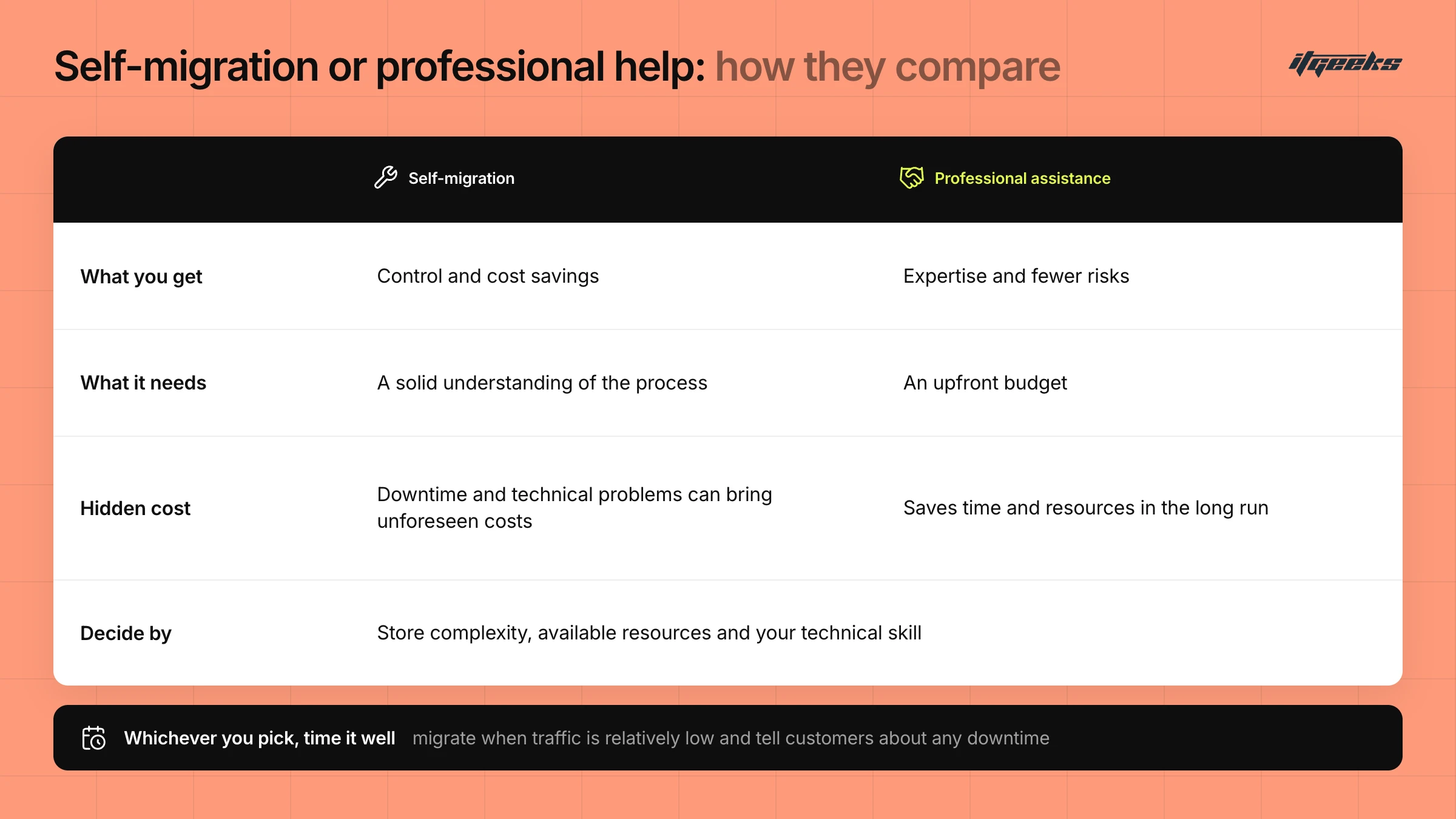
When transitioning your Shopify store, one of the crucial decisions is whether to embark on a self-migration or seek professional assistance. Self-migration offers control and cost savings, but it requires a solid understanding of the process and potential challenges. On the other hand, professional assistance ensures expertise, minimizing risks and optimizing the migration for a seamless transition. Consider factors like the complexity of your store, available resources, and your technical proficiency before making a choice.
Selecting the Optimal Timing:
Timing is key when migrating your Shopify store. Evaluate your business cycles, peak seasons, and inventory fluctuations. It’s advisable to choose a time when your website traffic is relatively low to minimize disruptions. Plan ahead, communicate with your customers about potential downtimes, and ensure that your team is prepared for the transition. The right timing can help maintain customer satisfaction and prevent revenue loss during the migration process.
Budget Considerations:
Migration costs can vary significantly, impacting your overall budget. Assess the expenses associated with both self-migration and professional assistance. Self-migration may seem cost-effective, but consider potential downtime and technical challenges that could lead to unforeseen costs. Professional assistance may involve upfront expenses, but it can save you time and resources in the long run. Evaluate your budget constraints, weighing the benefits of a smooth migration against the potential financial impact. Remember that investing in a well-executed migration is an investment in the future success of your Shopify store.
If you are weighing up partners, read our guide to choosing the right Shopify migration agency, or follow the broader complete guide to migrating to Shopify.
Step-by-Step Guide to Shopify Store Migration
Data Transfer and Import
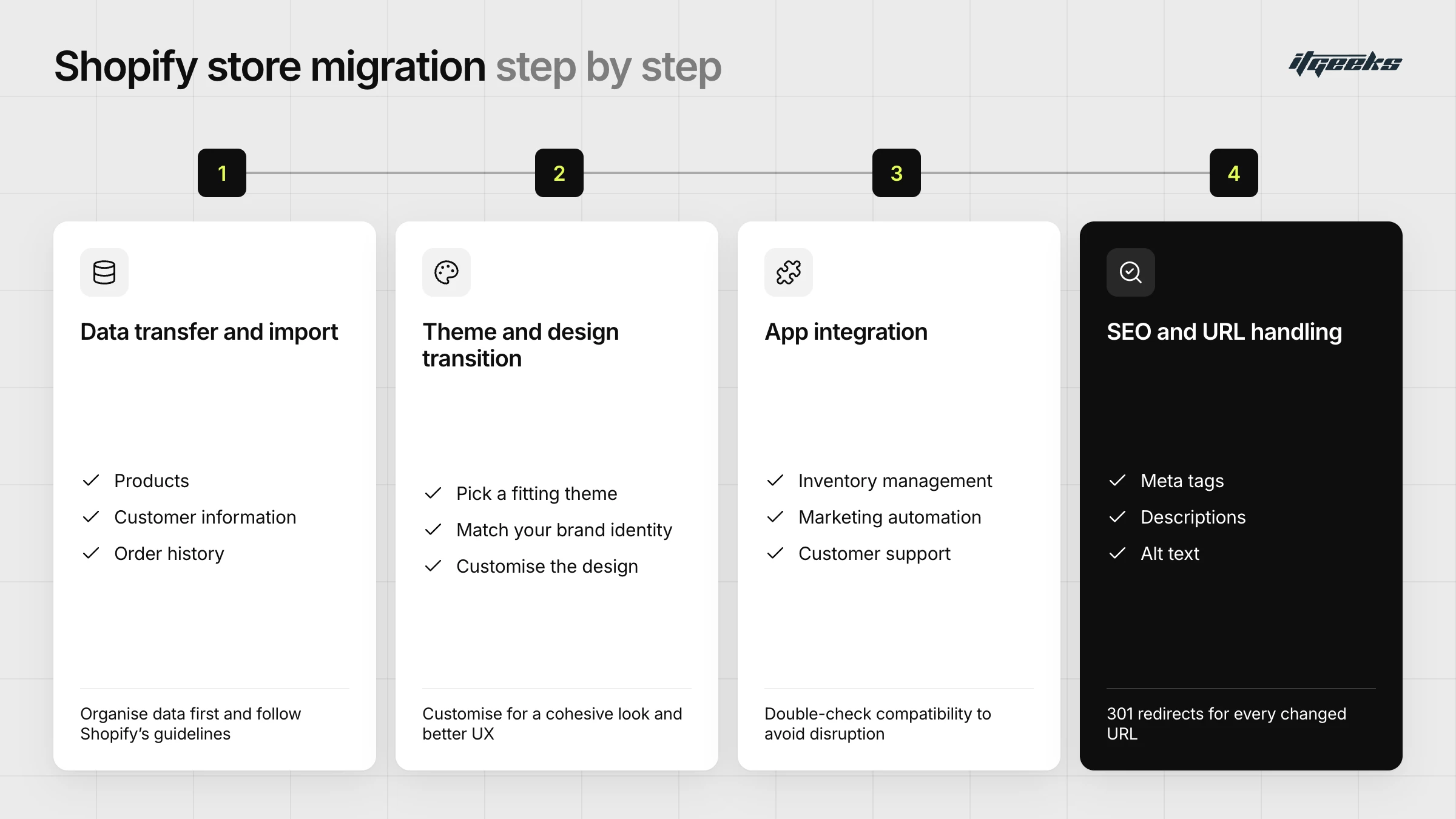
The first step in migrating your store to Shopify is transferring your data. This includes products, customer information, order history, and more. Shopify provides easy-to-follow instructions for importing data from various platforms. Ensure a smooth transfer by meticulously organizing your data beforehand and following Shopify’s guidelines.
Shopify’s own migration guide recommends importing products first, then customers, then historical orders, so each order links to the right product and customer. You can move data with CSV files, a migration app such as the Store Migration app, the Shopify API or a Shopify Partner, and Shopify notes that some data cannot be moved by CSV alone. Turn off new order notifications before importing historical orders so customers are not emailed about old orders. Read more in the Shopify Help Center guide to migrating to Shopify.
Theme and Design Transition
A visually appealing and user-friendly website is crucial for attracting and retaining customers. Shopify offers a range of professionally designed themes that cater to different industries. Choose a theme that aligns with your brand identity and products. Customizing the design is easy with Shopify’s user-friendly interface, allowing you to maintain a cohesive look while enhancing the overall user experience.
App Integration
Shopify’s App Store is a treasure trove of tools and applications designed to enhance your store’s functionality. Whether you need inventory management, marketing automation, or customer support solutions, Shopify has you covered. During the migration process, ensure that your essential apps are integrated seamlessly. Double-check compatibility and functionality to avoid disruptions in your day-to-day operations.
SEO and URL Handling
Preserving your store’s search engine rankings and ensuring a smooth transition for your customers is vital. Prioritize the optimization of your new Shopify store for search engines by updating meta tags, descriptions, and alt text. Additionally, set up 301 redirects for any changed URLs to maintain link integrity and prevent a negative impact on your SEO efforts.
In Shopify admin, redirects live under Content, then Menus, then View URL Redirects, where you can add them one at a time or import a CSV, and they take effect immediately. Build the map before launch: list every old URL, point each to its closest equivalent new page rather than the home page, and avoid redirect chains. Shopify can only redirect URLs that would otherwise return a 404, cannot redirect fixed paths such as /products and /collections, and allows up to 100,000 redirects per store (20,000,000 on Plus). See Shopify’s URL redirects documentation.
Also update canonical tags, internal links and your XML sitemap so they point to the new URLs. Google’s guidance on site moves with URL changes recommends permanent server-side redirects and keeping them in place for as long as possible, generally at least a year. For a deeper look, see our guide to maintaining SEO rankings during a Shopify Plus migration.
By following this step-by-step guide, you can navigate the Shopify store migration process effectively. Each stage plays a crucial role in ensuring a seamless transition that not only preserves your existing customer base but also sets the stage for future growth. Elevate your e-commerce game with Shopify and position your business for success in the competitive online marketplace.
Mitigating Risks and Troubleshooting: Navigating Shopify Store Transitions
Common Challenges in Migration:
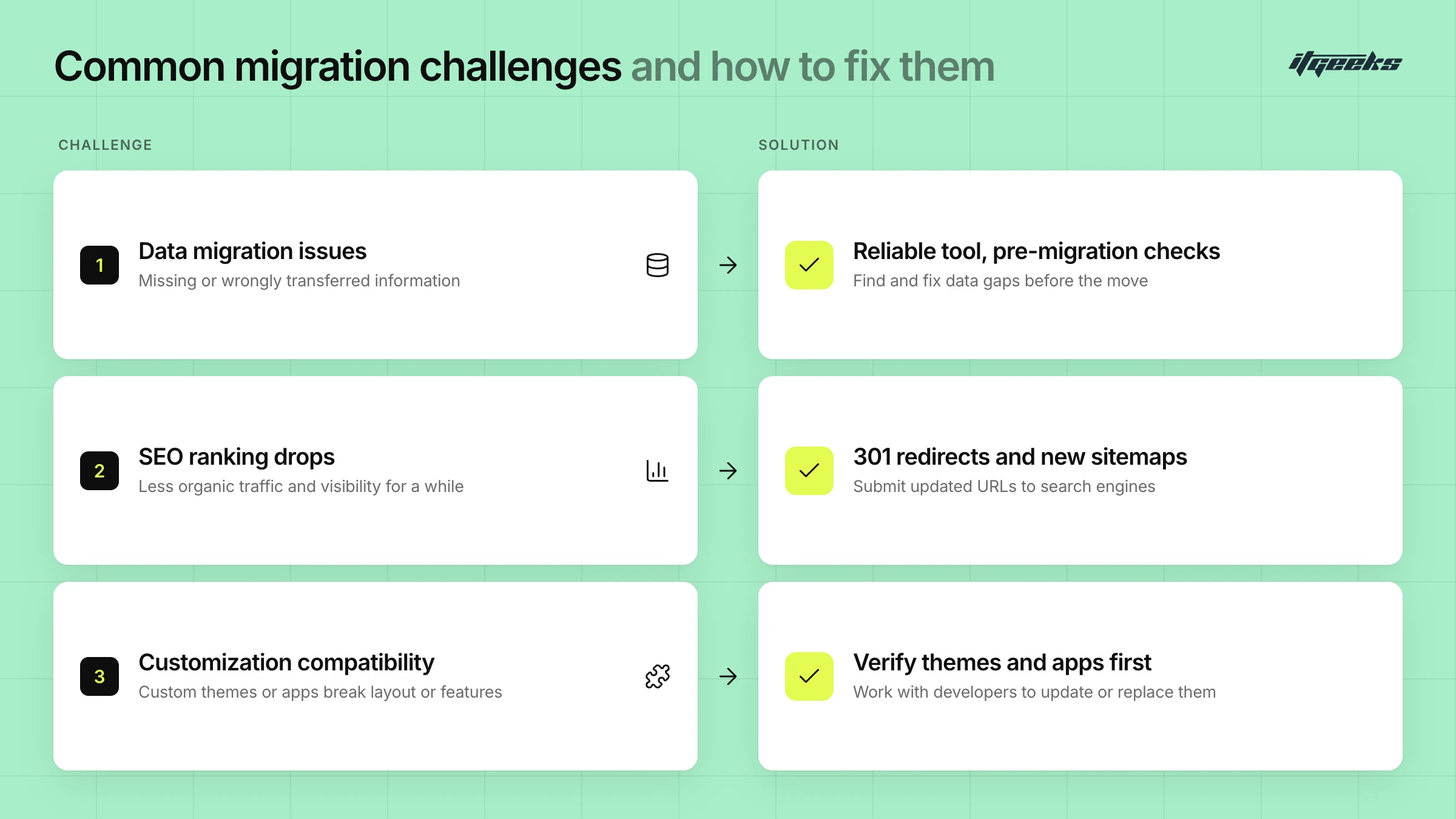
1. Data Migration Issues:
Explanation: During the transition, data migration is prone to errors, leading to missing or incorrectly transferred information.
Solution: Employ a reliable data migration tool and conduct thorough pre-migration checks to identify and rectify data discrepancies.
2. SEO Ranking Drops:
Explanation: Transitioning may temporarily impact SEO rankings, potentially affecting organic traffic and visibility.
Solution: Implement 301 redirects for key pages, update sitemaps, and submit updated URLs to search engines to minimize SEO disruptions.
3. Customization Compatibility:
Explanation: Custom themes or apps might not seamlessly transition, causing layout or functionality issues.
Solution: Verify theme and app compatibility beforehand, and collaborate with developers to update or replace incompatible elements.
Risk Mitigation Strategies
1. Thorough Planning:
Explanation: Inadequate planning can lead to oversights, delays, and increased risks during migration.
Solution: Develop a comprehensive migration plan, including timelines, resource allocation, and contingency measures to address unexpected challenges.
2. Backup Systems:
Explanation: Failing to back up critical data and configurations increases the risk of irreversible damage in case of unforeseen issues.
Solution: Regularly backup store data, configurations, and themes to ensure quick recovery in case of unexpected complications.
3. Staged Migration:
Explanation: Migrating the entire store at once can be risky; issues may be harder to identify and resolve in a bulk transition.
Solution: Opt for a staged migration, moving specific sections or functionalities incrementally, allowing for thorough testing and issue resolution at each step.
Post-Migration Testing
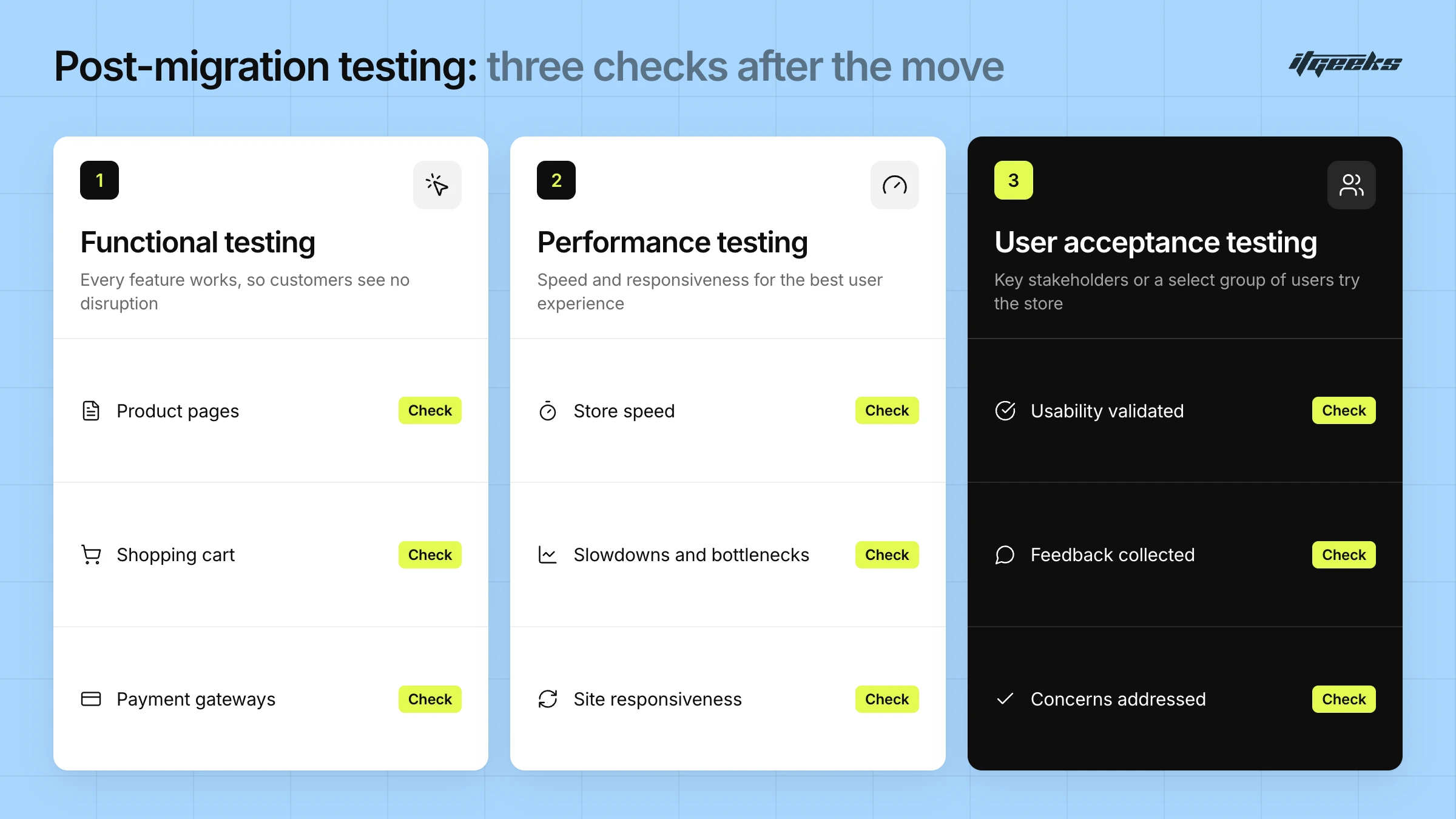
1. Functional Testing:
Explanation: Ensure that all features and functionalities work seamlessly post-migration to prevent disruptions in customer experience.
Solution: Conduct thorough functional testing, checking product pages, shopping cart functionality, payment gateways, and other critical aspects of your store.
2. Performance Testing:
Explanation: Assess the speed and performance of your store to guarantee optimal user experience.
Solution: Utilize performance testing tools to identify and address any slowdowns or bottlenecks in your website’s responsiveness.
3. User Acceptance Testing (UAT):
Explanation: Involve key stakeholders or a select group of users to validate the new store’s usability and identify any issues from a user perspective.
Solution: Encourage feedback and address any concerns raised during UAT, ensuring that the store meets user expectations.
By understanding and addressing common challenges, implementing robust risk mitigation strategies, and conducting thorough post-migration testing, you can navigate Shopify store transitions with confidence, minimizing disruptions and maximizing the success of your e-commerce venture.
Optimizing the Post-Migration Experience
User Experience Enhancement:
After successfully migrating your e-commerce store to Shopify, it’s crucial to focus on enhancing the user experience (UX). Evaluate your website’s design, navigation, and overall aesthetics to ensure a seamless and visually appealing interface. Consider optimizing product pages, simplifying the checkout process, and implementing responsive design to cater to a diverse audience. A positive user experience can significantly impact customer satisfaction and retention.
Performance Monitoring and Optimization:
Continuous monitoring of your Shopify store’s performance is essential to identify and address any potential issues. Utilize Shopify’s analytics tools to track website traffic, page load times, and conversion rates. Regularly optimize images, minimize code, and leverage content delivery networks (CDNs) to enhance the speed and responsiveness of your site. By proactively addressing performance issues, you can provide a smooth and efficient shopping experience for your customers.
Include search monitoring in this routine. In the weeks after launch, watch Google Search Console for crawl errors and 404s, spot-check that your highest-traffic old URLs redirect to the right pages, and compare organic traffic with your pre-migration baseline. Google notes that rankings can fluctuate for weeks on medium-sized sites and longer on large ones, so judge results over time rather than day to day.
Customer Support and Feedback:
Establishing a robust customer support system post-migration is vital for addressing any concerns or questions your customers may have. Offer multiple channels of communication, such as live chat, email, and a dedicated support hotline. Actively seek feedback from customers regarding their experience with the new Shopify store. Analyzing this feedback can help you identify areas for improvement and make necessary adjustments to enhance customer satisfaction. Additionally, consider implementing customer loyalty programs to reward and retain your existing customer base.
By focusing on user experience enhancement, performance monitoring, and customer support, you can ensure a successful transition to Shopify and create a positive post-migration experience for both your business and your customers.
Shopify Store Migration Checklist at a Glance
Use this condensed checklist to keep a Shopify store transition on track:
Audit the current store and record every indexed URL, app and integration.
Back up products, customers, orders, content and your theme.
Choose self-migration or a Shopify migration partner, and pick a low-traffic launch window.
Import products, then customers, then historical orders.
Set up the theme, apps and checkout, and test them before launch.
Map every old URL to a new URL and add 301 redirects.
Run functional, performance and user acceptance testing before launch.
After launch, monitor Search Console, analytics and redirects, and keep the redirects for at least a year.
Planning a move and want it handled for you? Learn about our Shopify migration services or contact the ITGeeks team.
Conclusion
In summary, successfully navigating transitions in your Shopify store requires thorough planning, strategic migration choices, rigorous testing, and ongoing optimization. Carefully assess your situation, set clear goals, and prioritize data migration for a seamless transition. Testing is non-negotiable to ensure a smooth customer experience, and post-migration monitoring and optimization are vital for long-term success.
Embrace change as an opportunity for growth in the dynamic e-commerce landscape. Approach the transition strategically, focusing on increased efficiency, enhanced features, and a stronger online presence. Use this process to propel your business forward, setting the stage for sustained success in the competitive world of online retail. Best of luck on your Shopify store transition, and may your e-commerce journey be prosperous and rewarding.